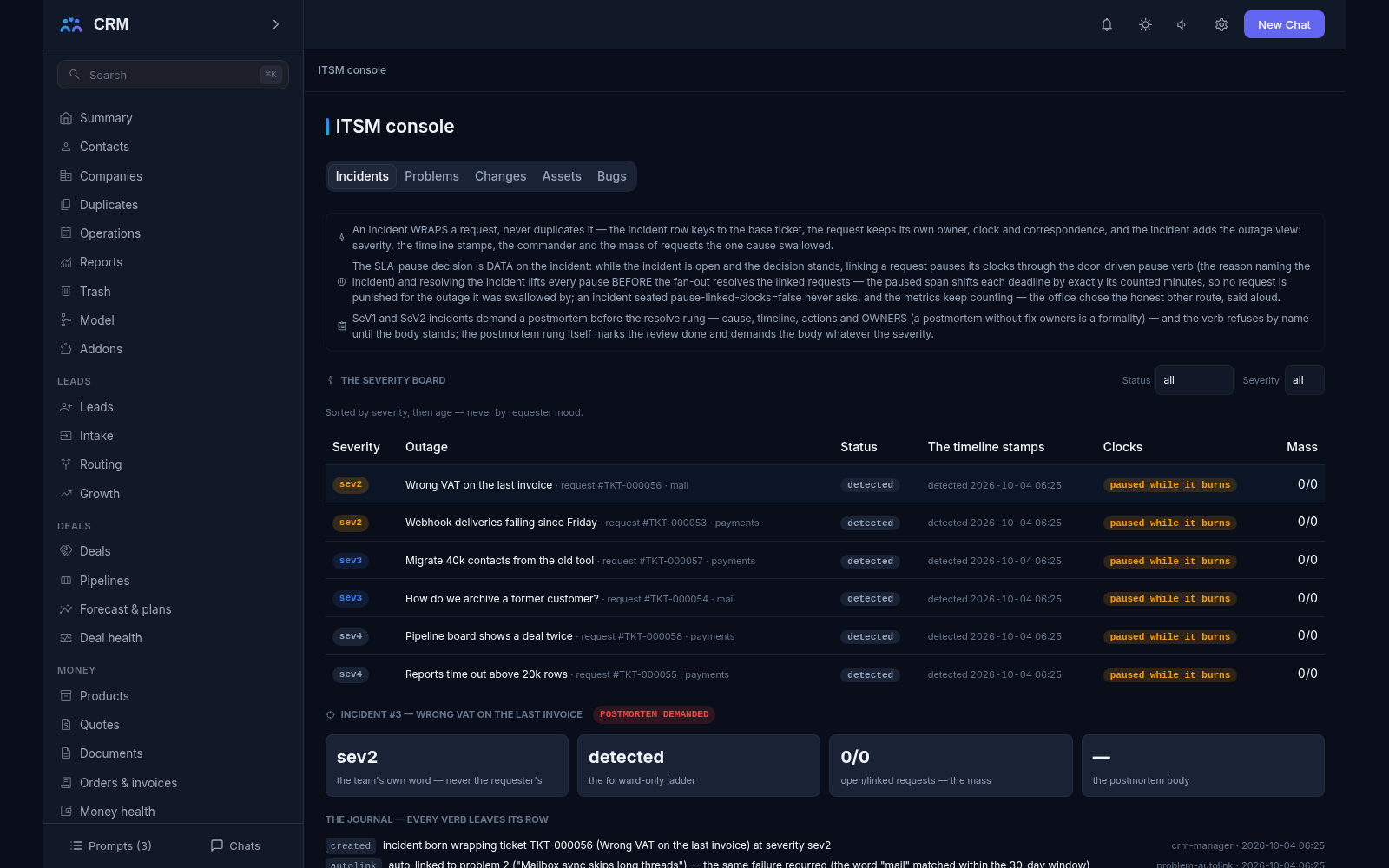
The add-on ITSM is for IT and service teams. It answers four questions: what is broken right now, why it keeps happening, what you are about to change and what is supported in the first place. Beside the requests sits a register of defects in your own products. The whole picture is managed from the ITSM console, whose tabs — Incidents, Problems, Changes, Assets and Defects — lay the work out.
Why you need it
A request can be closed, but its cause cannot. When the same failure arrives for the third time, support puts out fires one by one while customers write “you went down again”. At the same time nobody knows which work is planned for the weekend, which server sits at which client or until what date it is supported at all. The knowledge lives in correspondence and in one engineer’s head.
ITSM turns this into four clear objects. An incident shows the outage and groups the requests it hit, problems hold the causes of repeat failures together with a ready workaround, changes are planned with a rollback plan and approvals, and the asset registry answers “what is supported and where”. You find all of this out in advance instead of during an outage.
What it does
- An incident wraps a request, it is not a second request. The request stays ordinary: with its own owner, its own correspondence and its own deadline. The incident adds the outage picture to it: the severity is chosen by the team (from the first to the fourth — the client does not grade an outage), the rungs “detected → investigating → mitigating → monitoring → resolved → postmortem” with time stamps, the appointed incident commander, the affected companies, assets and service, and a place for the link to the status page.
- A major incident groups many requests. One explicit command ties many standing live requests to one open incident: one request at one moment is held by only one open incident, and every skip is named, not forgotten.
- The clocks of the affected stop. The decision to pause is data on the incident itself, and it is on by default. While the incident stands, linking a request stops its deadlines, and the journal receives the reason with the incident’s name. The pause holds even when the client writes into the request, and lifts only by its own exit: the incident’s closure or the unlink. One act of closure resolves all the linked open requests at once — with the note “resolved within the incident” and one notification to the owner. A request closed by another hand is walked past, with that written to the journal.
- A severe outage cannot be closed without a review. For severity of the first and second level the product demands a review: what happened, the timeline, the measures taken and the owners. Until the review exists, the incident cannot be closed — the refusal is named outright.
- The recovery time is visible at once. The report counts the time from detection to resolution — both as a median and as a mean, with the count for every severity level. The report is built from time stamps, not from somebody’s summary.
- Problems are the “why it repeats”. A problem is created with a mandatory owner (without a real person it is a formality) and a service, and passes the ladder “new → investigating → known error → resolved → closed”. The gates stand on the rungs: “known error” demands the workaround and a record of it, “resolved” demands the root cause, and only a resolved one can be closed. Records are never deleted — the closed rung seals the history.
- The repeat count is computed, not stored. Recurrence is derived from the links to incidents. A fresh incident that named the service word of an open problem inside a 30-day window ties itself to it — with a record in both journals. An empty word, a stale window or an ambiguous match (two open problems with one word) do not tie: a person chooses.
- A known error is published to the knowledge base. This is a separate explicit command: one open article per record, the symptom taken in the client’s words, the workaround carried over verbatim, and the problem’s owner becomes the article’s owner. Without the Knowledge base add-on the command refuses by name, and the card honestly says why the article was not published. A published article itself lands in the suggestions at tickets — like any ordinary public article.
- The workaround is visible where it is needed. On every request an open problem has swallowed, the standing workaround is shown. An employee answers the third repeat of the same failure with a ready solution while the real repair waits.
- Problems by importance. The report puts open problems first by recurrence, then by age, and prints next to every row the volume of swallowed requests and the owner’s name — you can see what to repair first.
- A change comes with a window and an owner. “What we are going to change” is created as a separate object with a mandatory owner and a mandatory pair of windows (start and end): a change without a window is a wish. It carries the risk word, the rollback plan, the test plan, the linked problems and incidents, the affected companies and assets.
- The change’s type decides the route and is fixed at submission. A standard one is pre-approved by its type and passes no chain. A normal and an emergency one are submitted together with an approval chain: one or two rungs, each with its own approver and its own term, the second rung counted only after the first one’s decision. The approval comes exclusively from the chain’s decision — the office itself cannot approve a normal change. An emergency change pays for the acceleration with a mandatory review at closure. Submitting a normal and an emergency change demands the rollback plan, otherwise a refusal by name.
- A silent approver does not stall the work. Every decision is an immutable record: at a refusal a comment is mandatory, and editing is impossible at all. Once an hour a check of the expired rungs passes: it marks the rung, sends one notification to the approver and one to the change’s owner, and writes that to the journal. An expiry is only a mark, not a decision: the rung stays decidable, and the change does not move forward on silence.
- Closure demands a result. To close a change, the result text and the verification mark are demanded, and for an emergency one — the review as well: “it worked” is an assertion, and the result says what exactly was done. “Rolled back” is a separate honest outcome: it is available only from implementing or verifying and demands its own explanation. The share of emergency changes is counted next to the count and the denominator, and at 80% the product warns outright that the emergency has become the norm.
- The calendar and letters about the works. The change calendar is built over the windows at the moment of opening: a change crossing a month’s border is visible in both. The affected companies receive one letter about the upcoming works per change; companies without a live address are skipped by name, and a repeated run refuses.
- The asset registry. It answers one question: which server, at which client, in which incidents. The kinds: a server, a workstation, network equipment, a mobile device, a program, a licence, a service and a cloud resource. An asset carries its identity seats (inventory number, serial number, external identifier), the owning company and the assigned employee, the location address, the state, the criticality and the warranty expiry. The duplicate law holds: the same physical object cannot enter twice — a collision refuses by name and names the standing row, and empty seats never collide with each other.
- Links and criticality. An asset is linked to a company, an employee, a request, an incident, a change or a contract — one standing link per pair. If an asset is marked critical, its link to a request raises the request’s working priority to urgent; the raise happens exactly once, with the authorship recorded, is never lowered and is never undone when the link is removed — it is a fact, not a temporary right. An asset with standing links is not deleted: a write-off with a mandatory reason is offered, and without links the row goes together with its journal. Every movement stays in the maintenance journal.
- Entering a list by file. Before the import a match key is chosen — the serial number, the inventory number or the external identifier. A trial run answers with an exact reconciliation and writes nothing, and the execution gives the same numbers: how many created, how many updated, how many refused as duplicates — and every refusal names its row.
- Defects: your own errors under control. A defect has a product and a component, the version where it was found and the version where it was fixed (only the release team sets it), its own severity and its own priority, a mandatory owner and a place for the number in somebody else’s tracker. A defect is created from a request and carries the context over, but not the other side’s decisions: the reproduction steps copy the request’s text verbatim (with the cut named), attachments are carried by reference, so the bytes are not duplicated, and the title is taken from the request by default — while the owner, the severity and the priority are taken only from the defect itself. Ten ordinary requests from the biggest client outweigh one urgent.
- Defect links, duplicates and release. Every link to a request carries a direction: “symptom” — the request uncovered the defect, “affected” — the defect concerns this request’s client; one standing link per pair. The ladder “new → triaged → in work → fixed → verified → released” with the separate outcomes “wont fix” (with a mandatory reason) and “duplicate”: at a duplicate you must name the surviving defect, and the mass of links moves onto it, leaving no repeats behind. A release demands the fix version: the note “fixed in version…” lands on every linked request, but only the requests named in the command are closed — a release never closes a request silently, and closing a request never closes its defect.
- A letter to clients about the fix. This is a separate action with one template: the mailing goes over all the linked requests, a refusal on a specific request is honoured and named, requests without a contact or an address are skipped by name, every sent letter is written to the journal together with its list of recipients, and all of this happens once per defect.
- The “who is under the blow” report. Defects, linked requests and clients are computed from the links at the moment of opening; the defects that touched the most clients come first — those are the ones to repair. On a request card you can see which defect concerns it, whether it is already fixed and in which version.
- Quick outage registration. A monitoring system can report an outage by itself, through a separate API address: a repeated delivery of the same event doubles nothing — it answers with the already standing incident.
How it relates to other add-ons
ITSM rests on Service and the Knowledge base. Without Service there is nothing to wrap and nothing to link — there are simply no requests. Without the knowledge base a known error has nowhere to be published: the publish command refuses by name, and everything else in the add-on keeps working. The add-on catalog will not let you tick ITSM until both are installed.
The link with SLA is practical: a major incident stops the requests’ clocks, and SLA is what keeps those clocks. Without SLA there are no clocks at all, so there is nothing to pause. ITSM, in its turn, is what Contracts rest on: a contract’s coverage is set over the assets from the registry.
Honest limits
- Similar requests are not grouped into an incident automatically, and customer-facing status pages and on-call rosters do not exist — named deferrals.
- Problems are not detected from incidents on their own: the key is the service word, and the link stays a person’s act.
- There is no standalone known-error database: a record lives with its problem and is published as one article into the knowledge base.
- Change advisory-board meetings, libraries of standard-change templates and automatic change creation from a deployment are not built; what ships is route types and an approval chain.
- There is no full configuration management database: CI classes, typed relations, service maps and automatic discovery are not made. The registry answers one question — what is supported and where.
- There is no two-way sync with an external bug tracker: only a seat for the external reference, because one source of truth beats two.
- A request’s priority is not raised automatically by the number of reports: the exposure report shows who is affected, and a person decides.
All add-ons → Add-ons catalogue