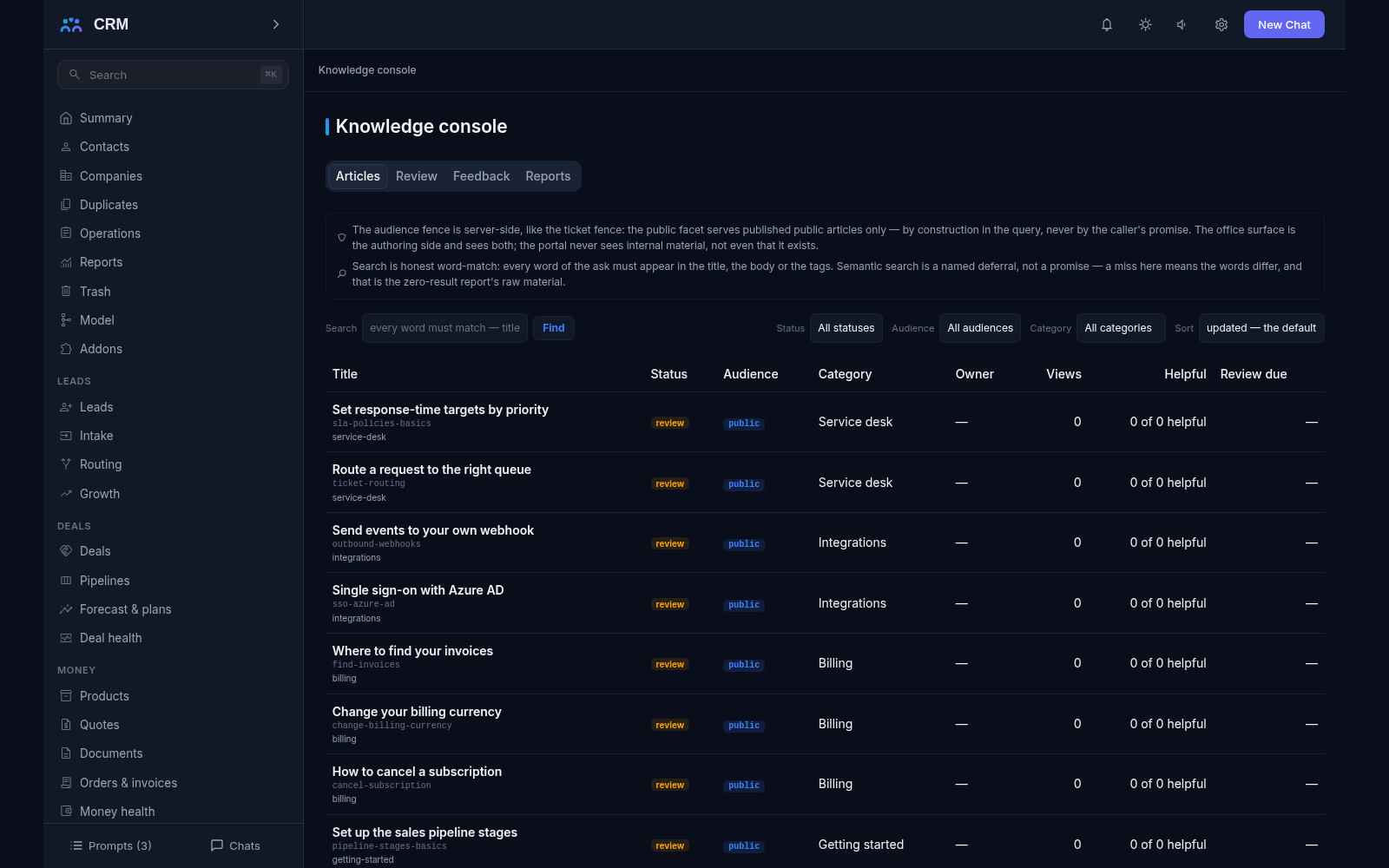
The add-on Knowledge base gathers the answers your team gives again and again into articles with owners and review dates. It keeps what the office knows current, offers the right article while a request is being answered, and opens published articles to customers in their own room. The work is gathered in the Knowledge console, whose tabs are Articles, Review, Feedback and Reports.
Why you need it
While answers live only in correspondence, every new employee works the obvious out from scratch, and customers get different versions of what should be the same reply. Worse is the instruction that went stale two years ago: people still follow it to the letter, and nobody notices the trap until a customer does.
The Knowledge base turns answers into a working process instead of a pile of texts. An article has a responsible person and a review date, a reader can vote on whether it helped, and the customer gets an open section with solutions. An agent attaches a ready article to a reply in one action rather than retelling it in their own words.
What it does
- Articles with an owner and a review date. Articles live in categories, each has somebody responsible for the content and its own review cadence: often-read and critical articles are reviewed every 90 days, the rest once a year. An overdue article lands in the report with its owner’s name but stays readable: the review date is a fact, not a lock on the door.
- Two audiences: the team and the clients. An article has an audience — internal or public. Internal articles are seen by the office, public ones by clients in the self-service section. The rule is checked on the server, so internal material cannot “leak” onto the customer page under any request.
- No deletions — there is an archive. An article cannot be deleted: it goes to the archive, and links from old tickets keep working. For a knowledge base that correspondence points at, this is fundamental — a vanished answer breaks the history.
- Helpfulness and statistics from the journal. A reader can vote whether the article helped. Views, votes and helpfulness are computed from the journal at the moment of reading, not stored as separate counters that sooner or later disagree with the facts.
- Suggestions at a ticket. By a ticket’s subject the product picks suitable articles: the subject’s words are checked against the title, the tags and the article’s text. The employee sees the assumptions and decides themselves what to attach. Word search lands in the journal, including the queries that found nothing — that is raw material for the monthly review. The Review tab shows which articles were offered, which were used and how often.
- Insert with one action. A public article can be attached to a public reply to the client, an internal one — to a note on the ticket’s history. An internal article in a public reply refuses by name: a client never receives internal material. Every insert is bound to the person who made it and to the ticket where it proved useful.
- An article draft from a ticket. A resolved or closed ticket can become the basis of an article — one draft lives per ticket. The text is written and checked by a person: an automatic draft from a language model is not built yet.
- A daily freshness pass. Once a day the product marks the articles that are due for review — once per article and cycle. Articles without an owner stay in the report silently and do not nag anybody.
- Reports. The Reports tab shows how many articles stand, how many times they were used, what share of tickets was closed with an article, and which questions stayed without an answer. Every share shows the denominator it was computed from — and nowhere is it claimed that “we halved the support load”.
- The section only reads. Changes are made as commands to the AI agent, which can be copied straight from the interface.
How it relates to other add-ons
The Knowledge base is self-standing and works even entirely on its own: articles can be kept, searched and voted on without the other add-ons. Suggestions and inserting into a reply start earning more beside Service: that is where articles are offered while a ticket is being triaged and attached to the answer. Without Service the base simply lives as a separate reference book.
The public part of the base rests on Portal: the client reads the solutions in their cabinet. Portal, in its turn, cannot be switched on without the knowledge base. There is a separate link with the ITSM add-on: a known error is published to the knowledge base with one command, and with the base switched off that command refuses by name, naming the missing add-on, and the problem stays as it was.
Honest limits
- Search goes by words, not by meaning: the product does not “understand” the question or look for something similar in sense. That is honest groundwork for what the suggestions rest on, and it is named as such.
- There are no sections for different brands, languages or article versions, and no version history or comparison of edits. An article lives as one text.
- Automatic drafting of an article from a request by a language model is a deferral. Today a person starts the draft from the request’s own words.
- An article is never deleted, only archived — otherwise the links from old tickets would stop working.
- The product never claims that a client “would have left on their own if they had read the article”: the share of self-service solutions is not invented, and only figures with a visible denominator are shown.
All add-ons → Add-ons catalogue