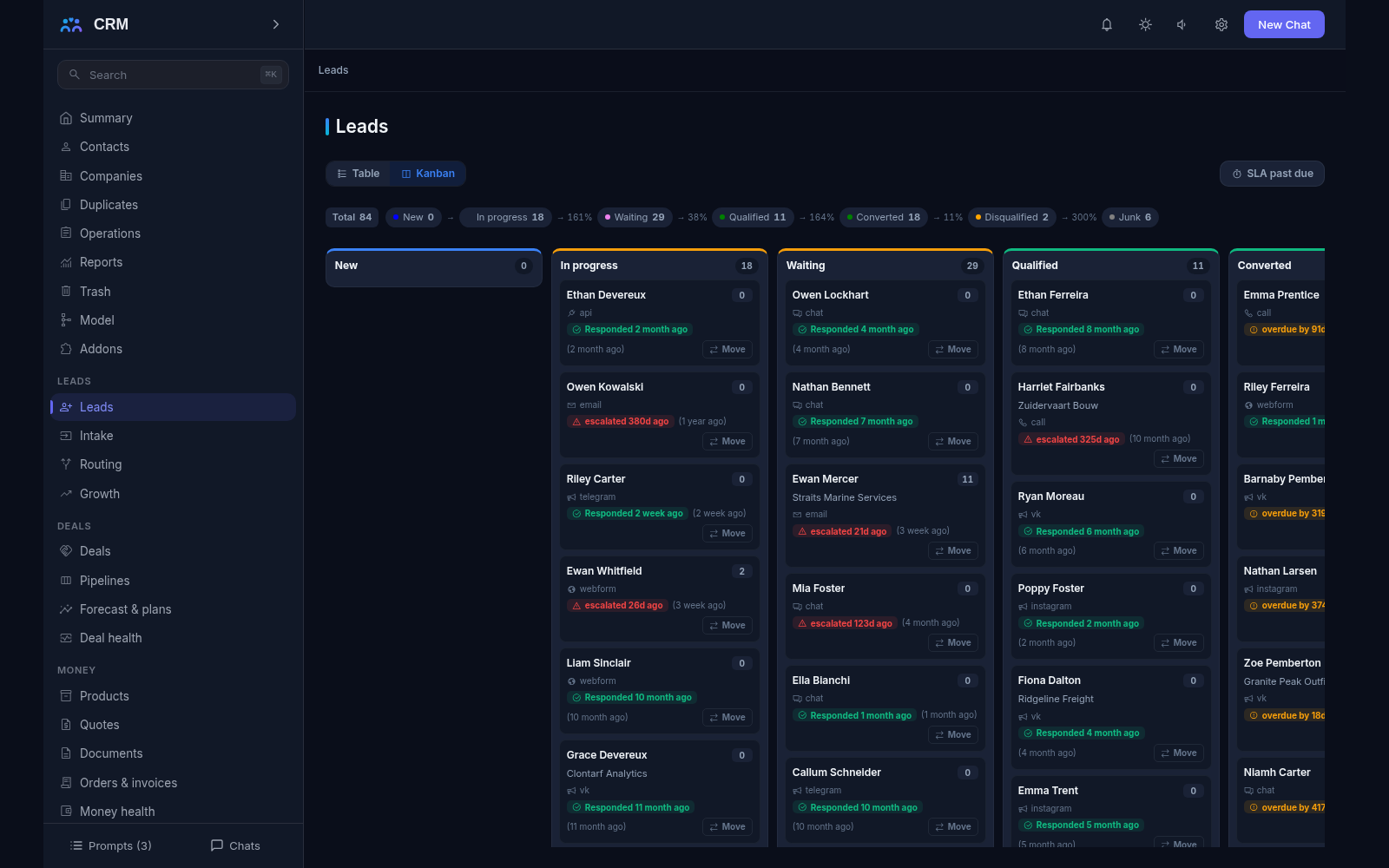
The add-on Leads gathers every incoming inquiry in one list: website forms, email, calls, chat messages and exports from other systems. Each new lead is handed to the right salesperson, gets a first-response deadline and a potential score, and — once the person is ready to buy — turns into a contact, a company and a deal in one operation.
Why you need it
Inquiries usually arrive in different places: one by email, another through a form on the site, a third by phone, a fourth as a messenger message. While they are being brought together, some have already gone cold and some are lost in someone else’s mailbox. And all of them look alike, although behind one stands a big customer and behind another a curious visitor.
The add-on closes both gaps. Every inquiry lands in one list with a clear owner, and each one shows whether you answered within the deadline. The potential score tells you who to call first instead of “whoever is at the top of the list”. The first-response clock runs from the moment the person sent the request, not from the moment someone noticed it. The result: fewer lost inquiries, and the team’s time spent where the money is.
What it does
- One intake for every channel. Website forms, email, the keyed public address, the call and chat webhook and imports all create leads through the same intake, so every card looks the same and carries the same history: channel, source, campaign, UTM tags, landing page and the time the person actually submitted.
- A public form page. A form definition renders as a plain page a visitor can open without logging in — they leave a name and a phone number. The form keeps the UTM tags of the ad click, and a spammer gets the same thank-you page a real person gets, so the bot never learns it was recognized.
- Keyed public intake addresses. Partners, ad platforms and your own systems can post to their own address with a key. The key can be replaced, each address has its own payload size and hourly rate limits, and the anonymous surface accepts inquiries only — never client-base records.
- The owner is mandatory. Rules decide who gets a new lead: by source, region or industry, or round robin between managers with each person’s workload taken into account. When routing fails, the product raises an alert: a lead without an owner is a fault, not a normal state.
- Scoring that explains itself. Points come from clear rules: a phone number is a plus, coming from search is a plus. The breakdown is visible on the lead, so you can see exactly how the score was built. Thresholds only mark a lead hot or warm — they never move it to another status on their own.
- First-response deadlines. A policy sets the deadline by which a person must get an answer, and the clock runs from the submission time, not from when the lead was noticed. An overdue lead climbs a ladder: a reminder first, then the manager. The first live human reaction — a call or an email — closes the deadline.
- A repeat never makes a second card. Before routing, the product asks “who is this”: a repeat from a known email or phone attaches to the same lead as a fresh touch and the repeat counter grows. That is how replies in an email thread work — a continuation of the conversation, not a new customer.
- Conversion into a customer. A qualified lead becomes a contact and a company in one operation, and the whole history moves across with it — nothing has to be re-created. If Deals is switched on, a deal is born in the same operation. The conversion can be undone within 48 hours.
- Sources, first touch and last touch. Every lead keeps its first touch — the set it was born with, never rewritten by later repeats — and its last touch, so source reports do not drift over time. Reports cover sources and days, with CSV export.
- Nurture sequences. A series of steps walks a gone-quiet lead forward: a task to call, a day later an email, a week later another call. Enrollment is deliberate — one lead or a filtered group, after a preview — and a client’s reply, an unsubscribe or a won deal stops the series on its own.
- Call lists and target lists. A call list is the working queue for the day: take the next record, note the outcome of the conversation, move on. A target list is a reusable selection for a campaign or a sequence, with exclusions by address and domain so an audience never quietly contains the wrong people.
- Nothing is lost. Every submission, accepted or refused, is journaled with its reason. Junk leads are purged and lost leads archived by their retention windows, the aging report shows the unprocessed tail, and channel health warns when the flow of inquiries suddenly drops.
- Notifications to your systems. You can tell your own systems about events — a lead created, a status changed — with signed notifications. If a receiver is unavailable, delivery is retried as the journal prescribes, and the server keeps only a link to the data, so nothing personal rides out.
How it relates to other add-ons
Leads has no required add-ons: it switches on by itself and works even when nothing else is connected. The deal step of the conversion appears when Deals is switched on — without it the lead still becomes a contact and a company, and the deal step is simply skipped. The site chat adds one more channel through the same intake, so chat inquiries arrive with the same card and the same rules. Switching Leads off is safe: the data stays in place, but new inquiries stop landing in the CRM.
Honest limits
- There is no dialer: people call, the CRM keeps the record. There are no separate connectors for each telephone provider either — one universal address is what a provider posts a call to.
- Call recordings are not downloaded: only the link to the recording and the facts of the conversation are kept. An outcome never changes the lead’s status by itself — qualifying or disqualifying is always a person’s reasoned decision.
- Score thresholds never move a lead to another status and never close it; they only hint at priority.
- Speed-to-lead reports use the median, the P90 and the share of inquiries left unanswered — never the average, which hides the failures.
- The public form cannot accept fields that are not on the intake address’s allowed list: a stranger cannot write anything they like into an inquiry.
- There are no ready-made connectors to the lead forms of ad platforms and social networks — only the keyed intake address, which any platform can post to.
- Auto-replies, inbound mail, internal notes, meetings and tasks never close the first-response deadline; otherwise the clock would burn down by itself.
- Junk leads are purged and lost leads archived by their retention windows; deleting a person’s data on request is a separate task, not part of this add-on.
All add-ons → Add-ons catalogue