The add-on Partners gives your resellers, dealers and agencies a cabinet on the portal: they register the customers they are working on — and the first registration holds the claim — receive the leads you assign to them, and download the price lists you decided to share.
Why you need it
Partner work usually rests on email threads and phone calls. Who brought the customer first is an argument in which each side has its own memory. A partner does not know which leads were handed over or until what date their customer is protected. Price lists are mailed out by hand, and there is always one partner quoting last year’s. Internal and partner sales are counted in different files, so it is impossible to see who actually brings the money.
Partners turns those agreements into records. A claim is submitted from the cabinet, the decision and its reason are visible to both sides, the protection has an exact end date, leads and price lists are handed over in one place and according to the partner’s tier, and an approved claim becomes an ordinary deal in your own pipeline — plainly marked as brought by a partner.
What it does
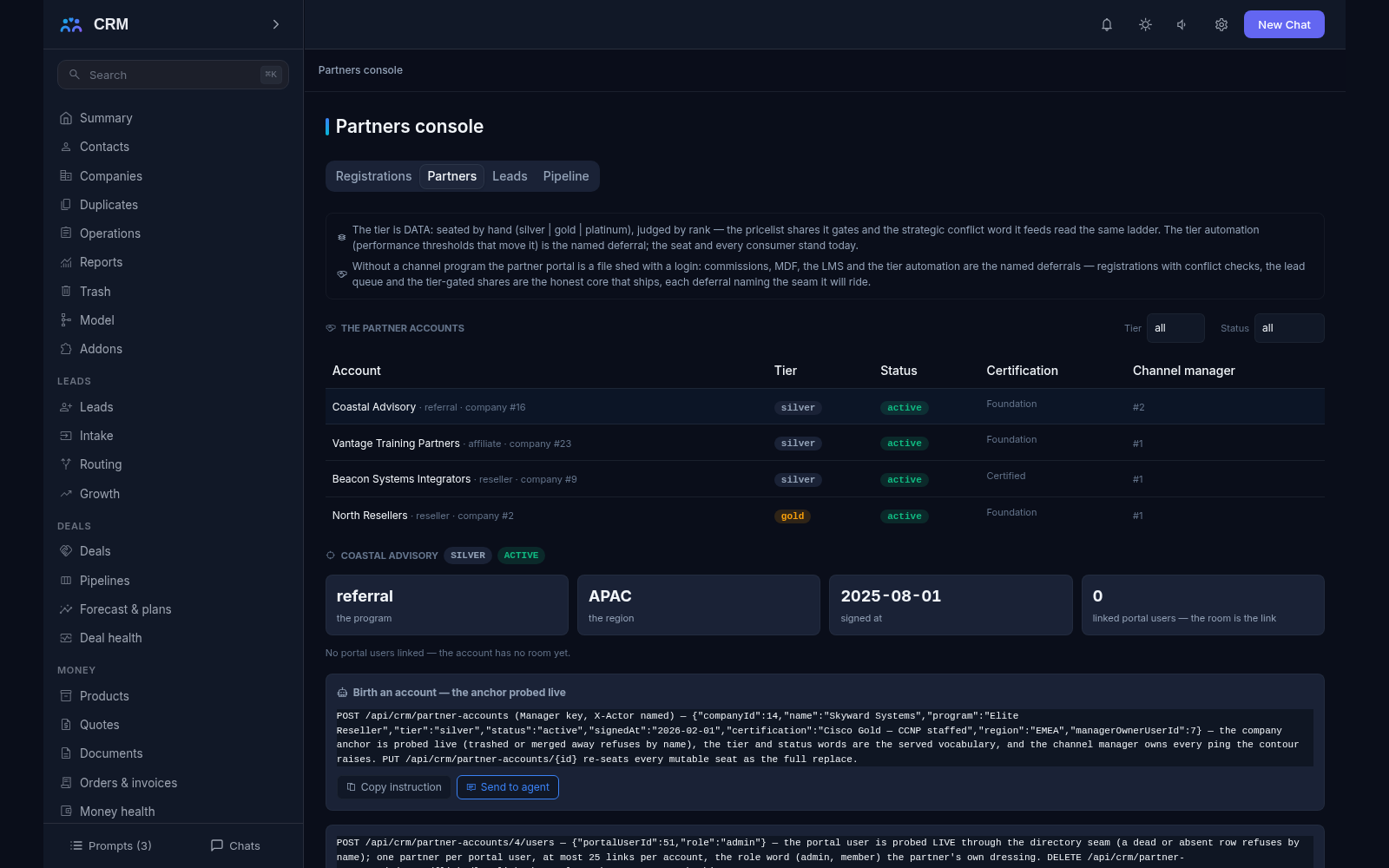
- Partner accounts. Each partner has a card: name, programme, tier (silver, gold or platinum), certification, region and a channel manager — the person on your side who runs the partner and is notified about their claims. Sign-in goes through Portal: a partner is a portal user, so there is no separate login and password to maintain, and one portal user carries exactly one partner account.
- A claim for customer protection. The partner registers the customer they are working on. The claim key is the end company’s name reduced to one normalised form: “Acme Ltd” and “acme ltd” are one claim and not two. The key is stored together with the whole claim history, so the same customer cannot “accidentally” be filed again under a different spelling.
- The conflict rule. What happens when two partners claim the same customer is decided by your office — the rule is chosen once and stored in the channel settings. The options: the first claim holds (the second is refused with its evidence named), the office decides disputes (only an open deal of your own team refuses a claim, and partner-versus-partner disputes go to review), or the senior tier goes first (a gold or platinum claimant queues for review, passing a strictly junior one). Under every rule, your own office pipeline outranks any tier.
- The protection window and the verdict. Protection has a term — 90 days by default, anything from a week to a year. A claim passes a clear path: submitted, in review, then approved, rejected or expired. Every decision is written to the journal together with the rule word and the evidence — refusals included, and refusals that stayed without motion included. The partner reads the verdict and its reason verbatim in the cabinet: “declined for internal reasons” is not a sentence you can write here, the reason is mandatory.
- Approval births a deal. An approved claim creates a real deal in your pipeline with the partner provenance on it: reports immediately show that a partner brought the sale, and under which claim. The deal is seated once — a decided claim never re-decides, so duplicates cannot appear.
- Window expiry. Once a day the product checks the protection terms. A lapsed claim moves to expired exactly once, it is written to the journal, the partner receives a letter, and the customer becomes free for other partners again. A repeated pass doubles nothing.
- Assigned leads. Your office hands specific leads to a partner. There are two modes: an immediate hand-over, or an “offer” the partner accepts themselves — the acceptance is recorded as their commitment. One handed lead is held by one partner: a second standing hand on the same lead refuses by name. The office can take a hand back — the history is not erased but stays in the journal, and the lead becomes free again. The partner’s linked users receive a letter about the change.
- Price lists and materials. Every file is addressed either to a named partner or to everyone not junior to a given tier. The tier is judged by seniority at download time, not at upload time, so a partner never keeps an outdated price list. The partner’s cabinet carries a separate price-list shelf in which they see exactly what is open to them.
- The partner’s cabinet. On the portal the partner sees three things: their registrations with verdicts and window end dates, the queue of handed and offered leads (accepting an offer is one action), and the price-list shelf. The pages are plain, with no outside calls and nothing extra: the partner sees neither your internal correspondence nor other partners’ deals.
- The partners console on your side. The CRM has one section with the tabs Registrations, Partners, Leads and Pipeline: the registration board with standing claims and expiring windows, the partner accounts, the lead queue — hands, not a firehose — the deals with attribution, the tier cuts and the volume by partner. The Channel desk panel on the home screen shows the claims waiting for your office’s decision and the windows on the edge of expiry. Totals are computed at the moment you look, never stored as a stale snapshot.
How it relates to other add-ons
Partners rests on two add-ons and will not install without them. Portal provides the cabinet and the sign-in: a partner is a portal user, so passwords, invitations and rights live there, not in a separate list. Deals provides the pipeline: an approved claim is born as an ordinary deal, and the conflict check reads your own team’s open deals.
The order of switching on is simple: Deals and Portal first, then Partners. The product will not let you switch Portal or Deals off while Partners runs, and names which one is in the way — otherwise partners would have nowhere to sign in and an approved claim nothing to turn into. Beyond that, Partners is linked to Service and SLA only indirectly: partner deals later live in the shared pipeline together with everyone else’s.
Honest limits
- Commissions, shared marketing budgets, partner learning and a partner offer marketplace are not in this add-on. The seats for them exist, but accrual and payout are not built, so count partner rewards outside the product for now.
- A partner’s tier is set by hand: there is no automatic promotion by sales volume and no automatic demotion. The tier is your decision, not a computed figure.
- The office always outranks the partner: an open deal of your own team beats any partner claim under every conflict rule, whatever the tier or the money involved.
- A registration is decided once and a window expires once. Protection cannot be extended retroactively and a rejected claim cannot be re-decided — otherwise the history would stop being evidence. A new attempt is a new registration.
- A partner cannot cancel their own accepted lead: only the office revokes a grant. That is deliberate — accepting a lead is the partner’s commitment to you.
- One lead is held by one partner at a time; one partner account belongs to one portal user; and a single partner carries at most 25 linked users, 500 registrations, 200 lead grants and 200 shared files.
- A partner account cannot be deleted while it carries links, registrations, grants or materials: the product refuses and names what exactly stands in the way. Suspension is available — the work stops, the history stays.
- When a company’s name is ambiguous across several records, the product refuses by name rather than guessing the customer: the office decides the ambiguous reading by hand.
- The partner cabinet is plain server pages: there are no separate apps, some internal labels remain in English, and there are no phone notifications to the partner — only letters on the decision, expiry and hand-over moments.
- The partners console only reads. Changes are made by commands to the AI agent — in the interface they can be copied with one button. That is a deliberate rule of the whole product: the interface does not write by itself.
- A partner’s tier does not yet unlock service-catalogue items automatically: such an item answers “ask the office”. The catalogue prices will open by tier when the tier machinery appears.
All add-ons → Add-ons catalogue