Xedant Agent has a built-in proxy server. A proxy is a middleman: it sits between the app’s engine (Claude Code) and the AI providers (Anthropic, OpenAI, DeepSeek), and every request and response passes through it. Because of that, the app always knows what the agent did, how much text it processed (in tokens), and what that cost in money. The proxy also translates requests into the format of any provider, so you can connect different AI models without changing the program.
Overview
The proxy is off by default. The app runs in direct mode, and the agent talks to the AI provider on its own. You don’t need to turn anything on until you actually use it. To enable the proxy, set the proxy type AGENT_PROXY_TYPE in the model’s settings (see “Protocol conversion” below).
When enabled, the proxy listens on 127.0.0.1 — the address of your own computer, so the traffic never leaves the machine. Claude Code connects to the proxy by itself, through the ANTHROPIC_BASE_URL variable. What this gives you:
- Request history — every request and response is saved to a database for 30 days. You can always look up what the agent actually did and where errors came from;
- Protocol conversion — requests are translated between the Anthropic, OpenAI, and DeepSeek formats, so you can connect different AI providers to the agent;
- Token counting — tokens are the “pieces of text” you pay the provider for. The proxy counts them for every request, including streaming replies;
- Cost calculation — spent tokens are converted into money at the model’s prices, with caching taken into account (re-reading text the model has already processed is much cheaper);
- Live updates — statistics appear in the interface instantly; no page reload needed;
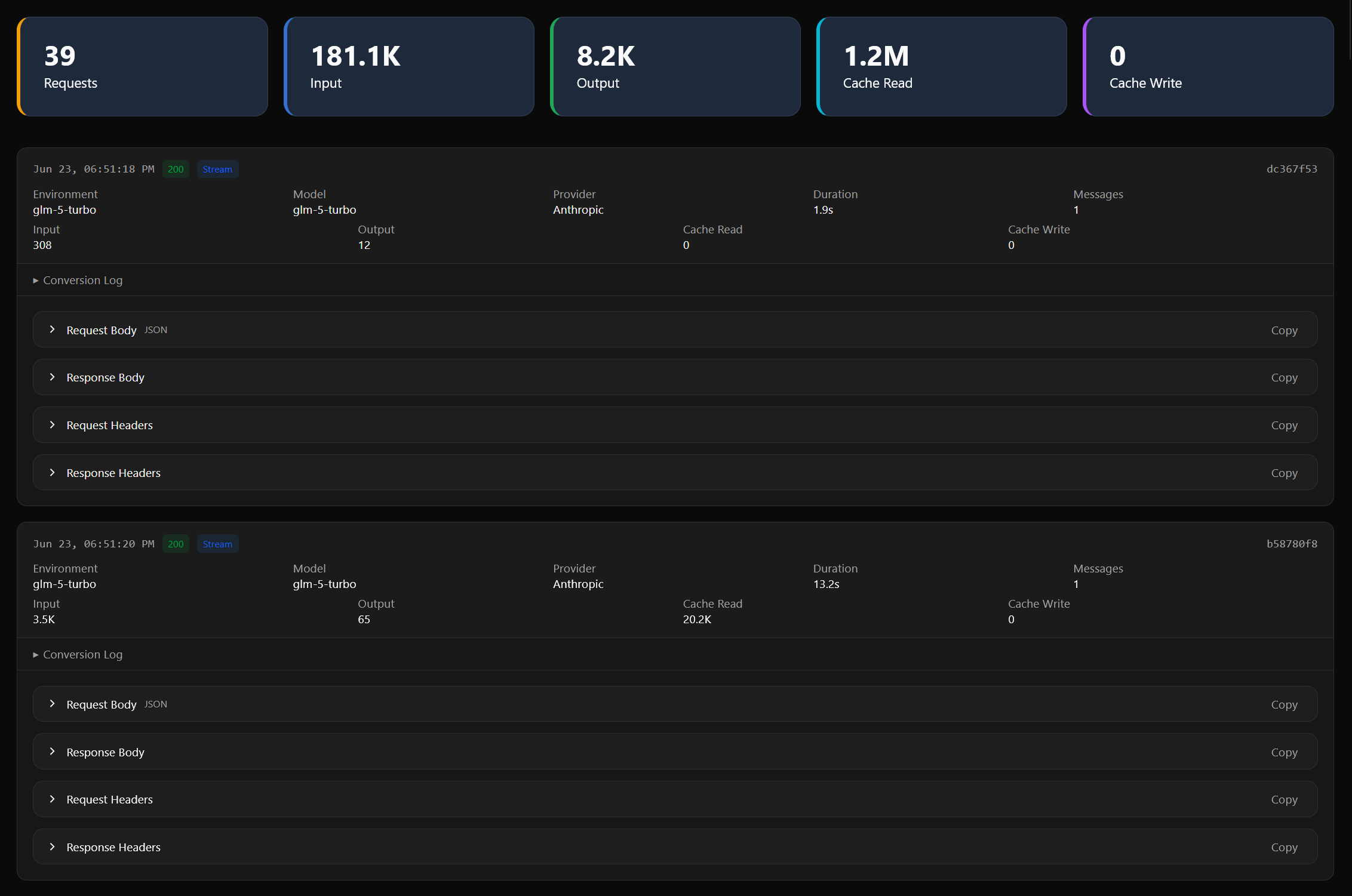
- Traffic viewer — a web page with the full request history for every chat, with details on demand.
How it works
When you send a message, Xedant Agent hands Claude Code the proxy’s address instead of the provider’s: http://127.0.0.1:{port}/{model}/{chat}/v1/messages. From there the request walks this chain:
- The proxy accepts the request from Claude Code;
- It works out which provider the selected model belongs to;
- If needed, it translates the request into the provider’s format;
- It forwards the request to the AI provider;
- It pulls the spent-token numbers out of the response;
- It saves a record to the database and updates the chat’s statistics;
- It returns the answer to Claude Code.
The proxy listens only on the address of your own computer (127.0.0.1) — the traffic never leaves the machine, so nobody outside can intercept it. Access keys (API keys) are automatically scrubbed from the logs: only technical details remain in the history, never secrets.
Protocol conversion
Every AI provider speaks its own data format (a protocol). The proxy works as an interpreter: it takes the request from Claude Code and, when needed, translates it into the language of the selected provider. The provider type is set by the AGENT_PROXY_TYPE variable in the model’s settings. Options:
anthropic (passthrough)
Talks to Anthropic directly: requests and responses pass through unchanged, and the proxy only records statistics — how many tokens were spent and what they cost.
openai
For providers compatible with OpenAI: requests are translated into the OpenAI format, so GPT and similar models can be connected. Token counting works for streaming replies too.
deepseek
A full conversion for DeepSeek: messages are normalized, the model’s “thinking” is cached (so it isn’t lost between requests), and model names are remapped. Extra settings are configured as JSON alongside the model (see below).
anthropicdeepseek
Access to DeepSeek through an Anthropic-compatible gateway (OpenRouter, for example) — handy when direct access to DeepSeek is blocked but the gateway route works.
direct (no proxy)
The default mode: the proxy is off and Claude Code talks to the provider directly. Request history and token counting aren’t available — which is fine for most tasks. Turn the proxy on only when you need those.
Configuration
The proxy is configured with environment variables in the model’s settings — the .xedant/models.yml file. Environment variables are launch parameters: you set them once, and the program applies them automatically.
models:
  my-model:
    variables:
      # Proxy type (required)
      - AGENT_PROXY_TYPE=anthropic   # anthropic | openai | deepseek | anthropicdeepseek | direct

      # Address of the AI provider (required for every type except direct)
      - ANTHROPIC_BASE_URL=https://api.anthropic.com

      # The two lines below are only for networks where internet access
      # goes through a corporate proxy (optional)
      - HTTP_PROXY=http://proxy.company.com:8080
      - HTTPS_PROXY=http://proxy.company.com:8080
DeepSeek accepts extra settings as a small JSON configuration (JSON is a simple text format that packs several settings into one place):
{
  "thinking": "enabled",
  "reasoningEffort": "high",
  "defaultModel": "deepseek-chat",
  "missingReasoningStrategy": "reject"
}
What the settings mean. thinking turns the model’s “thinking” before an answer on or off (you can turn it off for speed). reasoningEffort sets how deep the reasoning goes: the higher, the more careful the analysis — and the slower and more expensive. defaultModel is the model used by default. missingReasoningStrategy decides what happens if the model suddenly sends no “thinking” while the mode is on.
Traffic viewer
The /proxy page inside the app opens the whole proxy traffic:
- Overview cards — the total number of chats, requests, spent tokens, and errors;
- Chats table — statistics for every chat (tokens, cost, response time); the table can be sorted;
- Chat page (
/proxy/{chatId}) — all of a chat’s messages in order; requests and responses can be opened as JSON (a structured, easy-to-read data format).
Updates arrive on their own: a new request shows up in the interface instantly, with no page reload.
Statistics and cost calculation
From every response, the proxy extracts the spent tokens and converts them into money at the prices set for the model — the price per million tokens. If a model has no prices of its own, modest defaults are used ($0.60 per million incoming and $2.20 per million generated tokens); custom prices are set per model with the MODEL_INPUT_PRICE and MODEL_OUTPUT_PRICE variables. All token types are counted:
- prompt — the text sent to the model: your messages and file contents;
- completion — the text the model generated in reply;
- cache_read / cache_write — cache traffic: re-processing text the model has already seen, which is much cheaper.
Usage and cost show up right in the chat next to each message — turn this on in the “Chat” settings card with the “Show Message Tokens” option (see Settings).
Data storage
The history lives in its own compact database — the proxy.db file in the project’s .xedant folder:
- request_logs — the full request journal: what was sent, what came back, tokens, duration, errors. Cleared automatically after 30 days;
- reasoning_cache — DeepSeek’s “thinking” cache, used to restore the model’s line of thought after a pause. Cleared automatically after 7 days.
API keys and other secrets are stripped from the saved data automatically — the journal can be shown to anyone without risking a leak.
The database grows fast. Full request and response texts are stored, so a week of active use can pile up gigabytes. The automatic cleanup removes records older than 30 days, but within that window the file has room to grow a lot. If the history matters to you, archive the proxy.db file (in the project’s .xedant folder) at least once a week — copy it somewhere safe, like cloud storage or an external drive. On startup, the system re-creates the database when needed.
REST API
For programmatic access to the statistics — to export it into your own accounting system, for example — there is a REST API: a set of web addresses that hand the data to other programs:
- GET /api/proxy/status — whether the proxy is running;
- GET /api/proxy/logs — the request journal with filters (by chat, model, dates, errors);
- GET /api/proxy/chats — the list of chats with combined statistics;
- GET /api/proxy/chats/{chatId}/messages — all messages of a given chat;
- GET /api/proxy/logs/{requestId} — the detailed log of a given request.
Environment variables
- AGENT_PROXY_TYPE — the proxy type:
anthropic,openai,deepseek,anthropicdeepseek,direct; - ANTHROPIC_BASE_URL — the address of the AI provider the proxy forwards requests to (directly or through a gateway);
- HTTP_PROXY / HTTPS_PROXY — for networks where internet access goes through a corporate proxy (only if that’s your case).
← Back: Telegram Bot
Next: Settings →