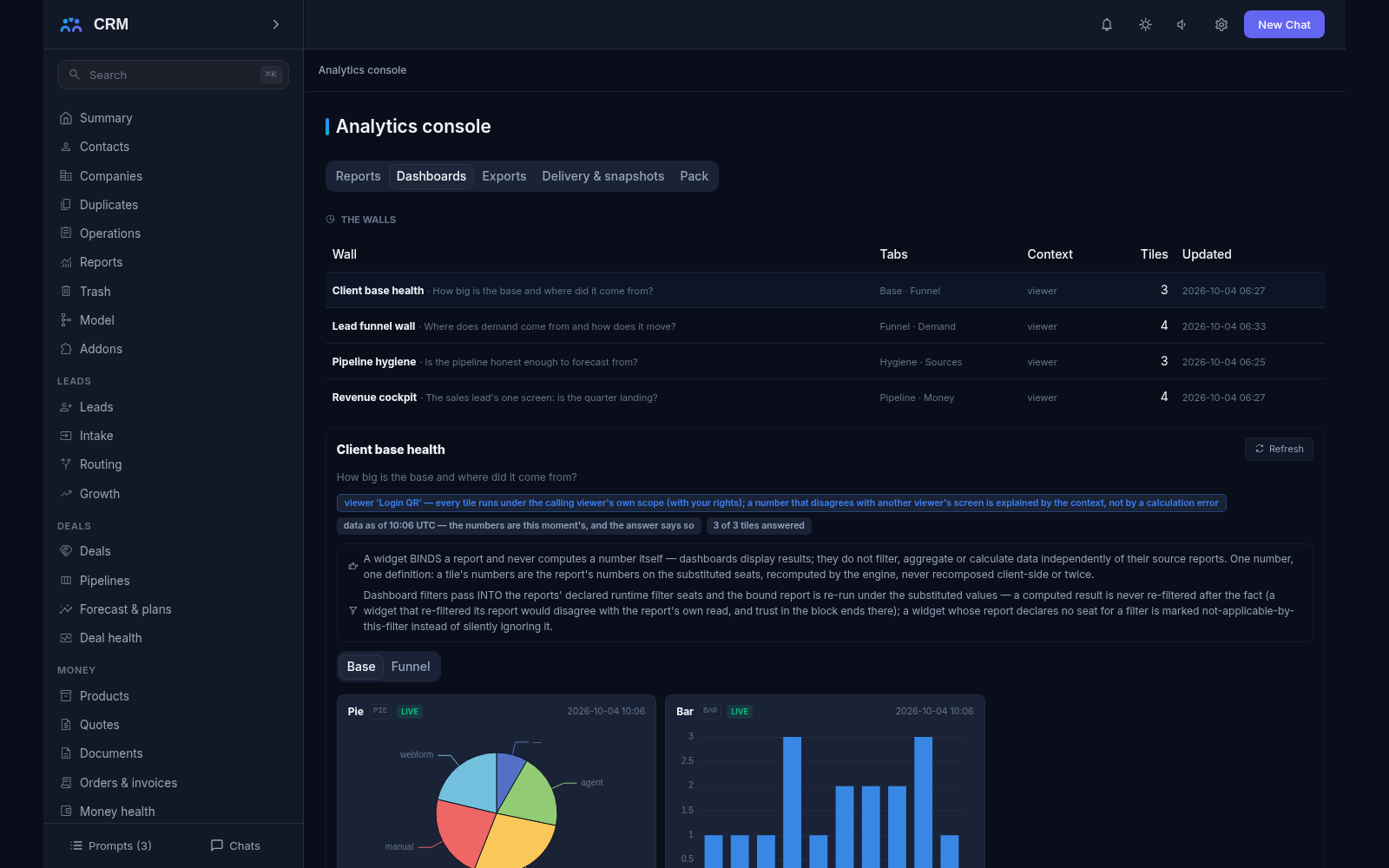
The add-on Analytics lets you build reports from the product’s own data yourself — no developer and no spreadsheet on the side. You describe in words what has to be counted, in which breakdowns and for which period, and the report runs on that description; it is saved once and then lives on, ready to be pinned as a tile on a dashboard, hung as a panel on a customer’s card or received by email on a schedule. Everything is managed from the Analytics console, whose tabs — Reports, Dashboards, Exports, Delivery & snapshots and Pack — show the analytical layer as data.
Why you need it
The built-in reports answer the usual questions: the sales funnel, deal velocity, request turnaround, customer debt. But business is wider than these questions. How many service contracts expire this quarter across our partners? Which managers lose deals more often than others after the second touch? How many unanswered requests are older than a day in each department? Calling a developer for every such question is slow and expensive, and assembling the numbers by hand in a separate spreadsheet is risky as well: the figures go stale the same day.
Analytics answers these questions from inside the product and on fresh data. It also removes a long-standing headache: the numbers in a report and the numbers in a list can no longer differ “a little”, because a report is built on the same filter the lists use and is cut by the same rights. Every answer says for which moment it was computed and in whose rights, so there is no argument about whose numbers these are.
What it does
- A report is a description, not a program. You name five things: which records to count (contacts, companies, deals, invoices, tickets, your own objects and others), which columns to show, which totals to take, one or two groupings, and the period — plus the ordinary filter, such as “only active customers” or “one branch”.
- Totals follow the field’s kind. Counts work on anything; sums and averages only on numbers and money. Summing a date or a name is meaningless, and the product refuses such a report at save, naming the column and the functions allowed for that field kind.
- The same filter as the lists. A report’s condition is the very same tree you put into a record list, so on one filter the report’s rows and the list’s rows match record for record. That parity is the foundation of trusting the numbers, not a promise in a manual.
- Breakdowns and periods. Grouping works on ordinary fields and on periods — day, week, month, quarter, year. One or two groupings, deliberately: two give a readable table, and five turn it into a puzzle. Conditions on the totals themselves (“only rows where the sum is over a million”) are allowed when there is a single grouping.
- Filters you choose at view time. Fields marked as runtime are left open in the definition and picked when the report is read — choose a period or a branch, for example, without editing the report itself.
- Where the numbers come from is stated. Every answer names the period base (created, closed or event date), the moment it was taken, the currency basis and the “with your rights” seat. The last one matters more than it sounds: a report never shows more than the reader may see in the lists, so the same report gives a manager and a salesperson different figures, and each sees in whose rights they are reading.
- Protection from false precision. A cell resting on too few records (under thirty) warns about itself instead of posing as an established fact — eleven deals prove nothing about a win rate — and a result cut by a row cap says “first N of M” rather than quietly trimming.
- Dashboards. A dashboard is one screen carrying several reports side by side: revenue, funnel, service load, repeat sales. Every tile binds a saved report and never computes anything itself, so the tile and the report always show the same number; the filters you set on the dashboard are passed into the reports and the totals are recomputed honestly, never re-filtered after the fact. The running context — your own rights (the default) or a fixed owner — is named on screen, and widget and tab caps bound the layout.
- A report panel on the record card. A report can hang on a customer’s or a deal’s card and answer right there. Such a panel must carry the record-to-filter binding: it answers about this record, never about “whatever the report happened to match”. If the fresh run misses its time budget, the panel serves the last cached answer stamped with the moment it was taken.
- History as snapshots. The picture changes over time, so once a day the product writes down that day’s numbers — one row per report, per filter variant, per day, never twice. Trend reads follow the snapshot series, and every answer stamps its basis: “live” or “snapshot taken at” a given moment. A live read never answers a question about March; that is what snapshots are for, and the read says when the series starts later than asked.
- Exports. A report leaves as a file for a spreadsheet — CSV with the right encoding, and XLSX that Excel opens — or as a printable HTML version for a meeting. Quotas (exports per person per day, rows per run) are visible numbers you can learn before you hit them, files expire after 24 hours, and each header carries the data moment, the report’s name and the rights basis.
- Delivery on a schedule. A report can arrive by email: the schedule comes from a preset list, each recipient gets their own letter, and a condition can skip an empty answer or an unchanged one (“no rows, condition not met” is journaled honestly). Every delivery lands in the journal, and a failure rings the shipped notification bell — silent failure is not an option.
- A ready pack and the door to external reporting. A pack of typical reports ships with the add-on: you copy one to change it and the seed stays pristine, and where a standing contour report already answers the question the pack row points at it instead of repeating its math. For an external reporting tool, datasets are written as versions with a watermark (the row count and the data moment) and a contract read serves their column shape, so a shape change raises a divergence warning instead of silently wrong numbers.
How it relates to other add-ons
Analytics depends on nothing: its required list is empty, so it switches on by itself on the core spine and immediately sees every record the product holds. The more add-ons are on, the wider the picture — deals, tickets, money and marketing appear in reports as they are installed. A report over records of a switched-off add-on neither crashes nor goes silent: the answer is a named sentence about the missing add-on, and the report returns the day it comes back. Analytics never takes reports away from the contours: the deal funnel, sales velocity, request turnaround, debt aging and marketing attribution stay their own sections with their own figures, and where a seeded report would duplicate one of them the pack points at the standing report instead. Switching this add-on off hides its surfaces while its definitions, dashboards, snapshots and journals stay intact.
Honest limits
- Reports are cut by rights. Nobody sees through a report more than they see in the lists, and every answer says so itself. That is a rule, not a shortcoming.
- Small numbers warn about themselves instead of pretending to be exact.
- Live data is always about now. A question about how things were in March is answered only from snapshots, and the answer says honestly when the series starts later than asked.
- A deleted field never slips by unnoticed. If a field a report was built on is gone, the product does not silently rebuild the report: it marks the drift in the definition read with the field named and refuses the run. An export behaves the same way and refuses the column rather than leaving a cell blank with no explanation.
- The contour reports did not move. The generic engine answers everything else, and where a ready report already exists the pack honestly points at it instead of repeating its journal-derived math.
- Data leaves for an external reporting system as versioned extracts, not as a live connection. The product writes a dataset with a watermark naming the row count and the data moment, and a change in the column shape raises a divergence warning instead of silently wrong numbers. Connectors, replicas and access tokens are named deferrals.
- There is no conversion into other currencies: sums are computed in the document’s currency. This is a named limitation, not something a setting can switch on.
All add-ons → Add-ons catalogue
More in the documentation: Analytics: Reports & Dashboards