Model and skills control is how you steer the AI’s behavior to get more reliable output. The right model gives each task the cost-to-capability balance it needs, while skills tell the model which project standards to follow — which noticeably improves its self-checking. The goal is to keep tuning your skills against the model’s mistakes until the quality is acceptable.
Model Configuration
Models let you switch between different AIs and providers without restarting your session. Each model is a named set of coding-agent variables: API keys, model names, base URLs, and prices. Everything is stored in .xedant/models.yml.
Variable Substitution
Variables can use $VARIABLE_NAME references. When a model is activated, they expand into real values — taken from the model’s other variables or from the system environment. This lets you keep secrets out of the repository:
# .xedant/models.yml — safe to commit
models:
  production:
    variables:
      - ANTHROPIC_API_KEY=$MY_API_KEY          # resolved from the system environment at runtime
      - ANTHROPIC_BASE_URL=https://api.anthropic.com
Hierarchical Inheritance
Model names support inheritance through hyphen-separated segments. The model glm-5-turbo automatically inherits variables from both glm-5 and glm. Define shared settings (API key, base URL) in the parent and override only what differs in the children:
models:
  glm:
    variables:
      - ANTHROPIC_BASE_URL=https://api.z.ai/api/anthropic
      - CLAUDE_DISABLE_EXPERIMENTAL_BETAS=true
  glm-5:
    variables:
      - ANTHROPIC_MODEL=glm-5
      - MODEL_INPUT_PRICE=1.00
  glm-5-turbo:
    variables:
      - ANTHROPIC_MODEL=glm-5-turbo
      - MODEL_INPUT_PRICE=1.20
Switching Models Mid-Chat
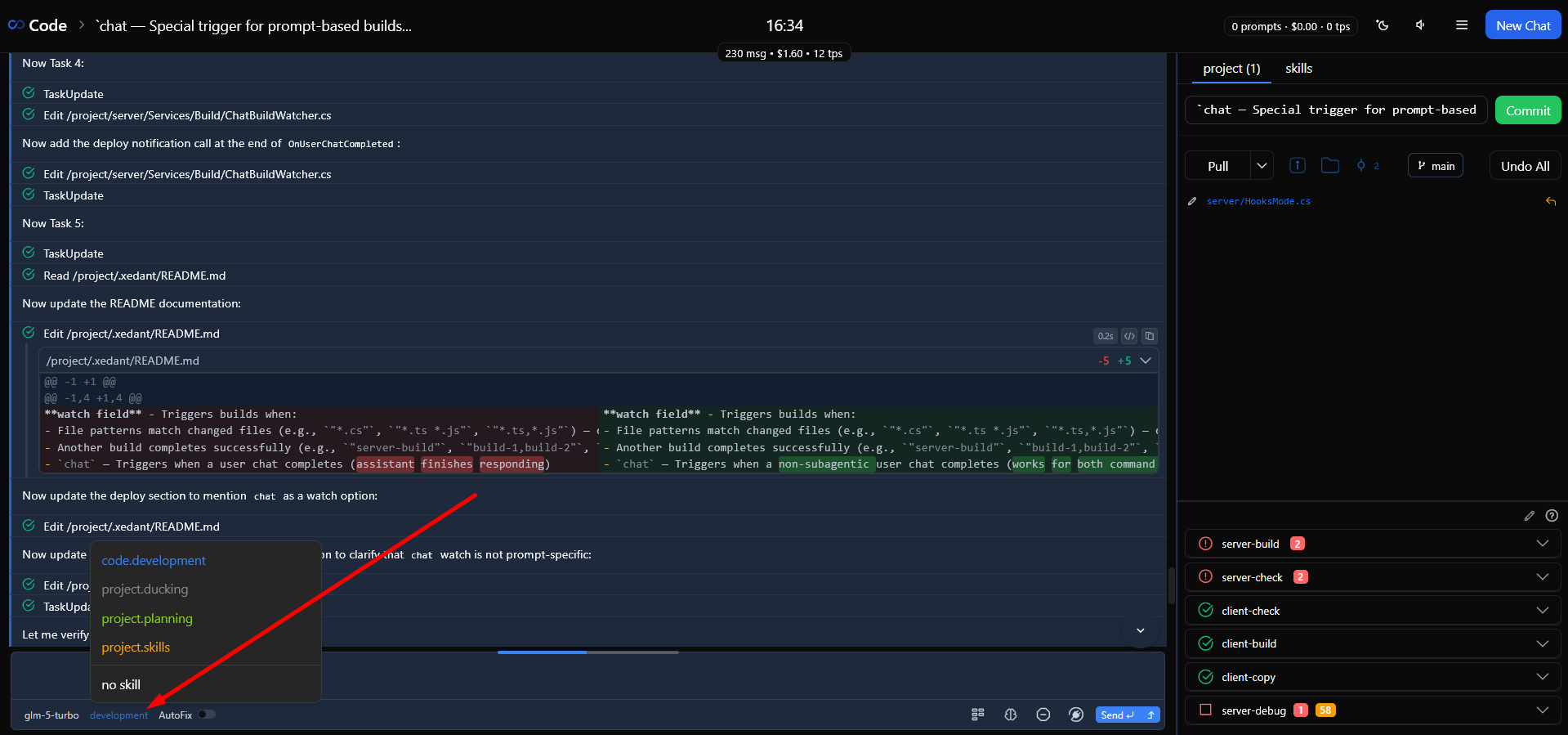
The model selector in the chat input area lets you switch at any time. Switching is instant — your next message goes to the new model, with no new chat and no page refresh. This is handy for using different models at different stages of a task: a cheaper one for research, a more capable one for implementation.
Skills as Validation Guides
Skills are folders in .claude/skills/ that hold a SKILL.md instruction file plus supporting resources (scripts, documentation, samples). They give the model project context. From a validation standpoint, skills are the main way to prevent mistakes before they happen.
SKILL.md Frontmatter
Each skill’s SKILL.md starts with a YAML header (frontmatter) holding its metadata:
---
name: code.development
description: Core development workflow for this project
allowed-tools: Read, Write, Edit, Bash, Glob, Grep
model: claude-3-5-sonnet
---- allowed-tools — a comma-separated whitelist of tools the model may use while the skill is active. Restricting tools shrinks the room for mistakes and prevents unintended actions;
- model — overrides the default model for this skill, useful when a skill needs a different capability level.
Writing Validation Rules into Skills
The most effective validation happens before the model writes any code. Put specific rules into your skill instructions that prevent typical mistakes. But don’t bloat the skill files: the more context there is, the less attention each requirement gets — which is both costly and ineffective. Start empty, add short one-line rules only after the model makes a mistake, then ask the model to tune the skill itself until the mistakes stop. Let the skill correct the model instead of doing it by hand, and don’t tolerate even rare mistakes. If the model gets lost among files or tools, or behaves unexpectedly — stop and ask it to fix the skill first, then start a fresh chat to verify. Keep at it until it is perfect.
- Coding standards — naming conventions, file organization rules, the project’s architectural patterns;
- Technology constraints — which libraries to use, which patterns to avoid, best practices for your framework;
- File structure rules — where new files go, how to name them, which imports or annotations are required;
- Process instructions — for example, “don’t build manually — builds start automatically when files change”, so the model doesn’t waste tool calls.
Expect 20–30 iterations of adding rules after mistakes before most routine tasks reach roughly 85% accuracy.
Skills Configuration
Skill display settings are stored in .xedant/skills.yml: each skill has an entry with a color field so you can tell skills apart visually in the selector. Every skill that has a SKILL.md file is always active and appears in the chat’s skill selector; you can change the color in the skills dialog.
skills:
  version: 1.0
  settings:
    code.development:
      color: '#3b82f6'
    project.planning:
      color: '#84cc16'
The Skill Selector
The skill selector in the chat input area shows the list of skills with their colors, plus an explicit “No skill” option. The choice is tied to the chat the same way the model is: it is restored when you reopen the chat and inherited by new chats. Loading the skill itself is automatic — the requirement travels to the coding agent out-of-band (a system prompt line, a launch flag, or an environment variable), so your message stays clean. See the Skills page for details.
Pick the skill that matches the task at hand. A development skill loads coding standards and workflow instructions, a planning skill loads architectural guidance, a website skill loads content management patterns. Each skill focuses the model’s attention on what matters right now.
Effective Validation Patterns
- Write specific instructions — vague rules like “write clean code” don’t help. A specific rule like “all API endpoints must return NotFoundResult with a message field” does;
- Restrict tools per skill — if a skill only needs to read and write files, don’t give it Bash. Fewer tools means fewer ways to go wrong;
- Use different models for different tasks — a fast, cheap model for simple edits; a powerful one for complex implementation. Switch mid-chat as the task evolves;
- Improve skills iteratively — every mistake is a reason to improve the skill. The curve is steep: 20–30 fixes get you to about 85% accuracy.
For the full models reference see the Models page; for skills, see Skills; for context optimization, see Context Utilization.