The add-on Inbox gathers every conversation with a customer into one place: email, calls, SMS, messengers, social and website chat all sit in one history. The whole team reads the same dialogue, so a customer never has to tell their story twice.
Why you need it
When correspondence lives in personal mailboxes and phones, the company depends on one person’s memory. A customer writes an email, then calls, then leaves a message in a messenger — and starts over each time, because every employee sees only their own part of the conversation. When an employee leaves, the history of talking to their customers leaves with them. And there is no way to see how many requests are still waiting for an answer and how many are already overdue.
Inbox turns the conversation into a shared company asset. Every channel lands in one timeline, a dialogue has an owner and honest clocks, and the queue always answers the question “who has been waiting longest”. Internal notes and work discussions are fenced off from anything that leaves the building, so employees can finally write the truth — “this customer is not going to pay”.
What it does
- One customer, one history. Eight channels — email, phone, SMS, WhatsApp, Telegram, Viber, social and website chat — are attributes of one conversation, not separate programs. One client writing from three channels produces one history anchored to one contact card, and the cross-channel probe answers “one client, one history”.
- Nothing is counted twice. Every inbound message is journaled once under its own external key: if the mail service or a messenger sends the same event again, the product notes it in the journal and creates nothing new. A redelivered webhook or a provider retry is a journaled no-op.
- One letter, one thread. A letter received into two monitored mailboxes still exists once — the account seat of the email key belongs to the channel bus, not to the mailbox — so a reply through the standard referencing headers joins the same family instead of opening a second thread.
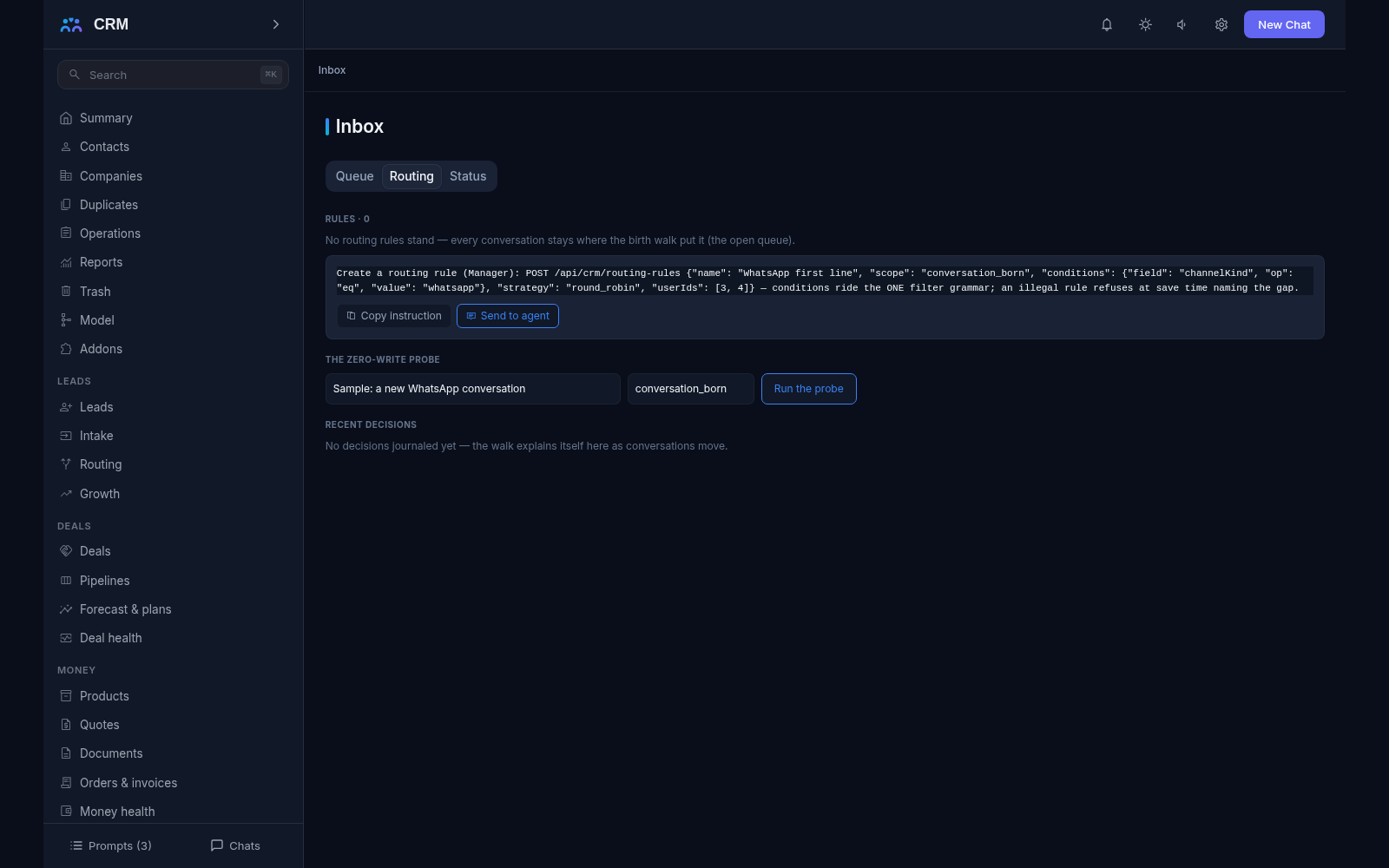
- The queue and the conversation states. The workplace is the Inbox console with the tabs Queue, Routing and Status. A conversation moves through open, pending, needs a human and closed; it can be snoozed for up to a year, tagged (up to 20 tags), assigned and reassigned. Every such change is a journaled fact with the acting principal, never a silent edit.
- Honest clocks. First-response and resolution clocks run from the moment a message arrived, never from an operator opening the record — otherwise a deadline would burn itself out from simple curiosity. Per-channel response targets are data rows (up to 16, each up to 30 days), and the queue shows Overdue and puts the longest-waiting dialogue on top.
- Who is in the conversation right now. While people work they see fleeting hints — “Ivan is viewing”, “Ivan is typing”. The hints live for seconds and are never written to the database: only what was actually said stays in the history. A second operator sees the truth and only the truth.
- One status and an honest load for the team. A user has one status across all channels — online, away, busy, offline — and away switches itself on by idleness (15 minutes by default). Load is never typed by hand: open conversations, how many need a human and who has waited longest are all computed from the journals at the moment you look. When nobody is online the product says so plainly and does not promise the customer an answer.
- Routing as data. Distribution rules are built from conditions over the same grammar that segments and views use (up to 100 rules, condition trees up to five levels deep), then a strategy is chosen: a named user, a team, round-robin, the least busy, or by skill. A rule carries a work schedule, an overflow threshold and an escalation. Every automatic handover writes an explained decision row, and a rule can be dry-run first — the product answers where a conversation would go, writing nothing at all.
- Overflow and offline reassignment. If the queue grows and nobody picks conversations up, the overflow ladder fires; the conversations of an operator who went offline are redistributed. Every handover is journaled, including the reason it happened.
- Internal notes and discussions. A note is a message inside a conversation that the customer can never see — no send path will ever let internal text through. A note’s visibility is one of three levels: your own, your team circle, or everyone; mentioning a colleague notifies them exactly once. Discussions work the same way on any record, and a discussion is born with its first message, so empty threads do not exist.
- Clients are not multiplied. An inbound message is matched to a client along a ladder: normalised email address first, then the E.164 phone number, then the messenger handle. If a message fits two records equally well, the product does not merge them — it records a merge proposal and a person decides. Adoption runs the core merge machinery, re-anchors every conversation onto the surviving card, and keeps a revert window.
- Social as an honest minimum. Public messages — comments and mentions — live apart from private ones, because a public thread may concern many people. A public comment can be turned into a private conversation with the normal escalation verb, leaving an internal trace note in the public thread. Private text can never be posted to a public page: the product refuses by name.
- One door for outside events. Communication facts from the outside — channel, external id, direction, body and timestamps — enter through one keyed ingestion door that runs the same idempotent walk. It is the place where future channels and third-party systems plug in: a new source writes into the shared model instead of opening its own table of correspondence.
How it relates to other add-ons
Inbox has no required add-ons: it switches on by itself and is the foundation of the communications contour. Four other add-ons rest on it — Email, Telephony, Messaging and the website chat widget. They cannot be installed without Inbox, and Inbox cannot be switched off while any of them runs: the product refuses by name and says which one is in the way. In practice the order is Inbox first, channels after. Installing Inbox later does not rebuild old correspondence into conversations — email, for example, simply kept its own letter history before, and with Inbox new mail becomes conversations as well. Each channel also switches off honestly: the others keep working, and only that channel’s part of the shared dialogue goes away.
Honest limits
- There are no ready-made connectors to third-party platforms: social networks, telephony operators, speech recognition and messenger aggregators are named deferrals. Facts from social networks and other systems enter through the external-logging door rather than appearing by themselves.
- There is no live operator reply to a visitor in the website chat panel. Today only bots and automatic replies write into the visitor’s panel, and an operator continues the conversation through other means — email or a messenger. That is an honestly named gap, not a hidden bug.
- Bot answers work only from your own curated knowledge — external language models are a named deferral. If a question goes outside the known bounds, the bot does not invent an answer: it refuses and calls a human. Taking a conversation over from a bot is irreversible by design, so the customer never gets two voices from one window.
- Clients are never merged automatically. A match of two records is a proposal, not a decision, and a person decides. A dismissed proposal is remembered with its note and cannot be re-decided — fresh traffic proposes the merge again.
- An empty conversation cannot be created: dialogues are born from traffic. Inventing a conversation in advance in order to add someone to it later is not possible, and a closed conversation cannot be continued — the next message from the same customer opens a new history, which keeps the reports and the clocks honest.
- An internal note is internal by construction: no send path will ever deliver it. That is exactly why it can be written freely, including colleagues’ mentions and an assessment of whether the customer will pay.
- The operator’s workplace only reads. Changes are made by agent commands, which can be copied straight from the screen. Two exceptions are deliberate: the live viewing and typing hints, and a user’s own status — a person sets those themselves.
- Switching Inbox off breaks nothing: the status column honestly disappears from the operators’ board instead of producing an error, and each channel behaves the same way on its own.
All add-ons → Add-ons catalogue