The add-on Marketing runs your customer base as one contour: email campaigns and newsletters, SMS and messenger messages, journeys and triggered letters, surveys, landing pages, loyalty, coupons, events and referrals — all under a single legal contour that records every consent and honours every opt-out. It also shows where your customers came from and which spend actually paid for itself.
Why you need it
When mailings go out from a manager’s personal mailbox and the customer base lives in a spreadsheet, a company takes risks it cannot see. Nobody remembers exactly who agreed to receive letters and what text they agreed to. Messages arrive at eleven at night and three times in one day. The complaint that puts your domain on a mail provider’s blacklist is discovered after the fact.
Marketing keeps that work in one place with a record behind every decision. Each consent is stored with the wording and the version the person saw, every send is checked against the recipient’s own local clock and one shared weekly limit, and a refusal always names its reason. A campaign is tied to leads and deals, so spend can be set against revenue, and loyalty programmes, coupons, events and referrals keep customers coming back.
What it does
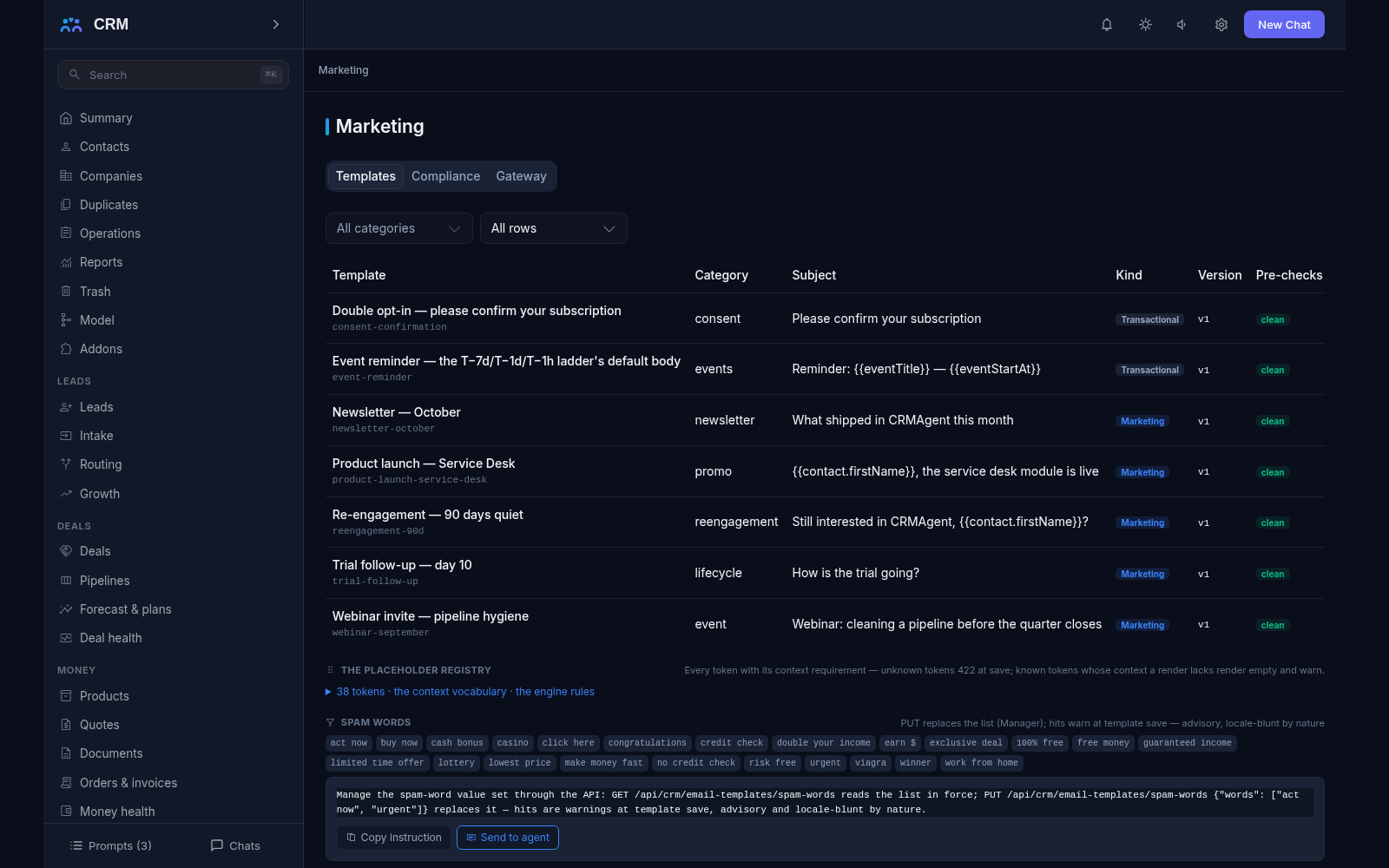
- Email templates. A template is a subject plus an HTML body with safe placeholders for contact, company, lead, deal and user fields, and for service links such as the unsubscribe link, the preference centre, today’s date, the current year and the tracking link. Every template carries a category, a transactional-or-marketing flag, a tracking switch and attachment references. The body may reach 100 KB, the last 20 versions are kept, and every send pins the exact (key, version) pair, so editing a template never rewrites a message that already went out. A mistyped placeholder is refused at save and named; a marketing template without an unsubscribe link refuses to save; a preview renders against a real contact, and a test send goes to at most five addresses.
- Consent with proof. The consent journal keeps every grant, confirmation and withdrawal as its own row, per channel and per topic — email, SMS, messenger and tracking against marketing, a named newsletter, transactional or processing — carrying the wording, its version, the source it came from and the IP address. Subscribing can require double opt-in: the row stays pending with a single-use 48-hour token until the person clicks the link in the confirmation email. Withdrawal is exactly as easy as granting, through a preference centre with per-topic toggles that needs no login and whose links never expire.
- Suppression — the addresses you must not touch. One list holds exact email addresses, whole domains, the workspace and individual subscriptions, each with a named reason: opt-out, complaint, hard bounce, soft bounce or manual. Rows born from a person’s own unsubscribe or from a mail provider’s bounce report are never deleted; only a row a manager created can be removed. The verdict check answers for one person and one channel whether a send may pass and names every failing check, and it is the same read the sender itself walks — so a refusal can never disagree with the explanation you were shown.
- One gateway in front of every send. Every outbound message of every channel walks the same checks in the same order: invalid address, missing consent, suppression, a marketing pause, quiet hours, the frequency cap, duplicate. Quiet hours are read in the recipient’s own time zone — email does not leave between 21:00 and 09:00, SMS between 20:00 and 10:00 — and a marketing message is simply deferred to the next open moment, while a receipt or a password reset goes through. The frequency cap is one shared counter: at most five marketing messages a week per person across every campaign, journey, trigger and channel, and at most three a week on a single channel. Every attempt — sent, refused or deferred — writes exactly one journal row with its reason named.
- Audiences as rules. A segment is a rule, not a list you maintain by hand (“all customers in Berlin who bought something in the last six months and have not unsubscribed”): there are computed segments, frozen static snapshots and subtracting segments whose only job is to take people out. Target lists add exclusions for a single address or a whole competing domain and can hold up to 100,000 people. A snapshot remembers its source rule, is rebuilt at most once an hour, and each rebuild journals how many members entered and left. A membership check explains why one record is in or out, and the preflight resolver answers beforehand how many people will receive the message and how many are held back, each bucket named and counted. The recipient list is frozen at the moment of sending — people may drift, a send does not.
- Campaigns. A campaign’s type decides its behaviour, so the classic email-versus-newsletter unsubscribe trap cannot happen: a one-shot promotion unsubscribes globally, a newsletter carries its own subscription topic (one key, one preference-centre line) and unsubscribes only that topic, and an informational service or licence letter is deliberately non-marketing — no opt-out link, no tracking, and it refuses a marketing template at save. Non-email, survey and event campaigns are attribution containers, and mail-merge is the export-only paper twin. The status ladder — draft, scheduled, sending, completed, cancellable from any live step — moves only through an explicit transition, and scheduling refuses an audience in which nobody has consented. The campaign log is append-only (sent, hard bounce, soft bounce, opened, clicked, opted out, replied) and is kept for 400 days, while the campaign row itself never expires.
- Mass email without double sends. A job freezes the audience once, pins the template version and queues one promise per recipient, so re-running a plan sends nobody the same letter twice. Each pass sends at most 100 messages and no more than 200 in an hour, and one job can address up to 50,000 people. Pause, resume and cancel all demand a written reason, and if hard bounces pass 10% of sent mail over a sample of at least 25, the job pauses itself and names the counts — better to stop and investigate than to burn your domain’s reputation.
- Tracking and honest statistics. Opens are counted through a day-idempotent pixel — a mailbox that prefetches the image all morning changes nothing — clicks go through redirects to the links frozen at send time, and bounces come back classified: a permanent reply creates a never-deleting suppression row and marks the address invalid, while a temporary reply is only counted and, once the pile grows, names its threshold. A reply by email lands as its own fact on the campaign log. The report leads with unique opens and clicks over distinct contacts, with click-through and click-to-open rates, and marks the open rate as unreliable with the reason stated verbatim, because some mail services open letters in advance.
- Triggers, journeys and auto-replies. A trigger rule is data: a named event (a new lead, a stage change, a paid invoice, an accepted quote, an email opened or clicked, an opt-out, a high-intent website visit, an answered survey, an event registration, attendance or a no-show), a one-level condition, a delay, a channel and a template — up to 100 active rules. Firing never blocks the write that caused it, and a burst is flattened: a person who opens the same letter five times in one day receives one message. An auto-reply answers a first enquiry once and promises honestly — at 22:00 the acknowledgment says when the office opens, never “within 30 minutes”, and an automated touch never stops the human speed-to-lead clock. Anything longer than one rule lives in a journey: a validated graph of up to 50 steps with pauses of up to 90 days, published as frozen versions.
- SMS and messengers. Short messages and chat messages use the same placeholder catalogue with their own templates and versions, their own consent topics — agreeing to email never implies SMS — and their own length honesty: the character set is detected, and the segment count (160 or 153 characters per part in Latin script, 70 or 67 otherwise, up to six parts) is shown before you send. A STOP word withdraws consent and creates a never-deleting suppression row, and the workspace can carry a daily SMS budget. Delivery reports and inbound replies arrive through a keyed ingestion endpoint: a reply lands as a message on the contact and as a task for its owner.
- Attribution, spend and value. Touches are captured at the door and materialised when a deal closes, under one of five named models — first touch, last touch, linear, time decay or U-shaped 40/20/40 — with a 90-day window by default (up to a year), at most 100 touches per deal, shares that always add up to exactly 100%, and an “other traffic” line shown beside every table so nothing is hidden. Cost rows by day, source and campaign feed the report: spend, leads, won deals, cost per lead, cost per order, cost per customer and return on marketing investment, all exportable to CSV. Every report writes a dash rather than a zero when there is nothing to divide by.
- Surveys, landings, experiments and loyalty. Surveys cover NPS, CSAT and your own questions, up to 20 of them; the NPS scale is never shortened and the “why” question is mandatory. One person can answer once every 90 days, answers are kept for three years, and an unhappy respondent creates one task for the account owner. Landing pages and web forms go through the same intake as every other request, with spam protection and the consent wording stored — up to 30 blocks per page, 30 fields and five consents per form, and at most 50 pages published at once. Experiments run two to four variants over at most 60 days with at least 1,000 participants each and pick a winner by a proper statistical test, only after you confirm it. Loyalty points accrue when an invoice is paid, idempotently, so reprocessing a payment never doubles them; there are up to ten tiers and points may pay up to 30% of a document by default. Coupons bind to an existing discount rule, carry a check digit inside a code of up to 24 characters, and count off exactly at posting. Events with their reminder ladder, referral codes and the marketing cockpit panel — base health with the legal split, marketing attention, and the marketing contour — complete the picture.
How it relates to other add-ons
Marketing is the most connected add-on in the product: it declares three required add-ons — leads, deals and money — and will not install without them. Leads supplies the target lists and the events such as “a new lead appeared” that triggers listen to. Deals anchors attribution: a deal’s campaign of record and a campaign’s revenue are counted over won deals. Money carries loyalty, since points accrue when an invoice is paid, coupons, which bind to a discount rule, referral payouts and customer-value segments. The practical order is therefore Leads, Deals and Money first, then Marketing — and the product will not let you switch any of those three off while Marketing runs, naming which one is in the way, because the mailings and reports would lose their base. One more link is optional: Messaging runs the dialogue itself, as Marketing only gives the command to send; without the channel contour there is no messenger dialogue to send into, and the product says so plainly instead of pretending the message left.
Honest limits
- There is no drag-and-drop email builder: a template is text with placeholders, prepared by a person or an AI agent. Careful markup is possible by hand, but a letter cannot be assembled by dragging blocks around.
- SMS operator connections and WhatsApp, Telegram and Viber are separate integrations. Until one is connected, the channel honestly calls itself unconnected and refuses by name — the product does not pretend the message left.
- Spam complaints are not pulled from mailbox providers automatically: such addresses are added to the suppression list by hand. Only hard bounces suppress themselves — soft bounces are counted and, once the pile grows, their threshold is named, but nothing auto-suppresses them.
- Advertising spend is entered manually or by an agent command: there are no ad-platform connectors, and exporting conversions back to ad systems is not included. Below roughly a hundred subscribers or followers an advertising platform compares you with a much wider public, so such small-sample figures are a note on the report, not a measurement.
- There is no data-driven attribution model and no custom formula: five named models, nothing more. Attribution explains the connection between touches and a sale — it does not replace bookkeeping, and the report says so directly.
- A trigger rule sends one message; a multi-channel scenario belongs in a journey, and a journey’s steps have no open counters of their own — opens and clicks are visible only on tracked campaign sends. The open rate is marked unreliable, because some mail services open letters in advance, and it is deliberately not treated as the single measure of success.
- Landing pages are not a website builder: the blocks are typed, there is no free layout, at most 50 pages are published at once, and web forms live inside landing pages — there is no separate screen for them. Survey, landing and preference-centre pages open by an external link and answer the same bare “not found” to a stale or forged one, and they carry no tracking of any kind.
- Gift cards are single-use by design: a partial balance cannot be exchanged. A coupon bound to a discount rule cannot be turned into money — only applied to a document. In the loyalty programme a tier rises but never lowers automatically, and redeeming points does not post money: the product hands you the exact instruction, and the Money add-on issues the document, because points are a liability, not a wallet. Referral programmes are single-level, with no multi-level trees, partner portals or tax exports — that is the separate channel contour — and social networks appear only as lead sources and as a dialogue channel: publishing posts, a content calendar and comment handling are not part of this add-on.
All add-ons → Add-ons catalogue