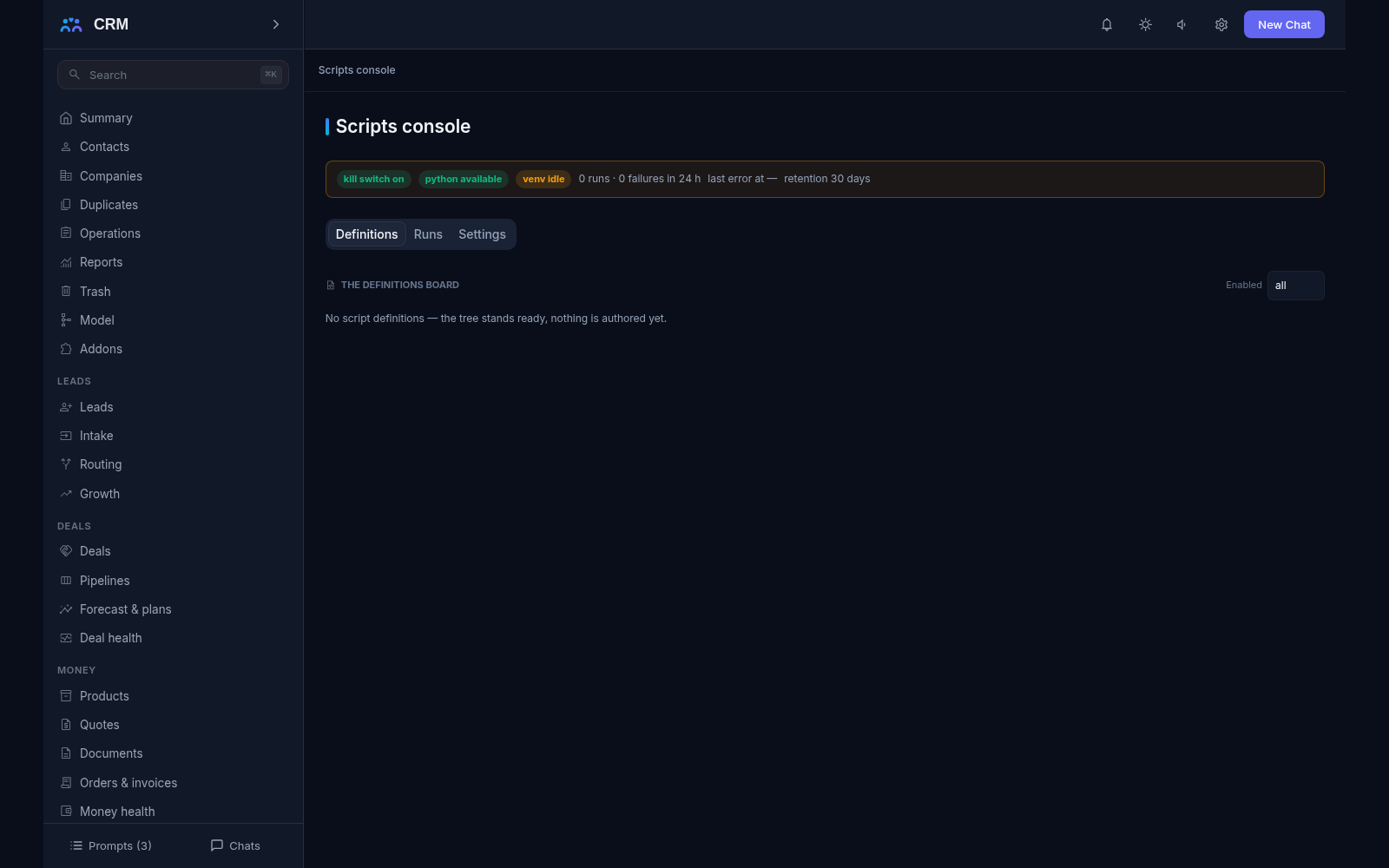
The add-on Scripts is your own Python code for everything the built-in tools do not cover: pull data from an external system, send it where it needs to go, reconcile two lists, tidy up old records. A script lives as a file in the project next to the other settings and is versioned together with them. Every run is visible in the Scripts console, whose tabs — Definitions, Runs and Settings — show the script list, the state of the runtime and what each run ended with.
Why you need it
A ready-made integration does not exist for every system. More often you need a small bridge: fetch the list of orders from another program once an hour, send a partner an export, compare two directories and hand the mismatches to their owners. Rebuilding the product for each of these little tasks is slow and unwise, and keeping the bridge in someone’s personal script on a work laptop is unreliable — it works for as long as someone remembers it.
Scripts give such tasks a permanent place. Your engineer or your agent writes the code once; after that it runs on a schedule, as a step in an Automation rule, or when an external system calls in — and every run stays in the journal. Edits take effect without restarting the product, and the code lives exactly where the other settings do and is stored with them: nothing gets lost in a personal folder.
What it does
- A script is a project file. The code can sit right in the script’s description or in a separate
.pyfile beside it. There is always exactly one source of code, and setting both is refused. Edits take effect without a restart, and the files are versioned together with the project. - Four ways to start a run. On a schedule, manually from the console, when an external system calls the script’s public address with its key, and as a step in an Automation rule. One script can be wired to several triggers at once.
- Schedule. A simple interval — “every fifteen minutes”, “once a day”. The product works out due-ness itself: a script that has not run for longer than its interval fires on the next pass. One run goes at a time per script, so runs never overlap, and a failed run does not cancel the schedule.
- A public address for external systems. An outside program calls the script’s address with its key and sends data; the request body and headers reach the code, and the answer carries the run’s facts and the script’s output. A wrong key starts nothing, an oversized request is refused, and too frequent calls are capped.
- What the script sees. The reason it was started, the arguments and the incoming payload, the environment variables you declared, and a persistent working directory for its own notes and state — handy for remembering how far it read last time. The product’s management key is not among them: a script cannot act on the product’s behalf.
- Secrets stay secret. Passwords and keys for external systems are defined in the script’s description and stored write-only: the console shows
***instead of the value. They cannot be read back, and stored values never appear in run journals or answers. - Libraries as one shared set. The list of required packages is declared once for all scripts and installed automatically into one managed environment. Separate dependency sets per script do not exist — and there is nothing extra to look after.
- The run journal. One row per run: what started it, when, how long it took, how it ended and with which error, saved together with the tail of Python’s own message, so you can work from facts instead of guesses. The console updates live, and the result appears as soon as a run finishes.
- A trial run before going live. A test with sample data answers right in the console: you see the output, or the error if something is wrong, and the trial carries its own run row.
- The state of the runtime. Above the script list you can see the essentials: whether scripts are enabled at all, whether Python is ready, whether the libraries are installed, how many runs and failures there were in the last day and for how many days the journal is kept. When something is missing, the product says so plainly instead of showing a silent green light.
- Limits as visible numbers. A global kill switch stops the scripts at once. A run gets one minute by default and ten minutes at most, and past that the whole process tree is killed; no more than two scripts run at the same time; the data passed in and out is capped at 1 MiB; the journal is kept thirty days by default; and the section holds up to two hundred scripts.
- An invalid edit never breaks a working script. If the script’s description contains an error, the product keeps running the last good version and surfaces the validation errors in the console, so one typo never stops work that is already in place.
- A script under protection. A script referenced by an active Automation rule cannot be deleted: the refusal names the rules that rely on it. The dependency is removed first, and then the file. A script nobody references deletes cleanly.
How it relates to other add-ons
Scripts is an independent add-on: its required list is empty, so it switches on by itself on the core spine, and neither its schedule nor its public address needs anything else. Its main consumer is Automation, where running a script is an ordinary rule action beside sending a letter or creating a task. When such a rule is saved the product checks that the script exists and refuses a reference to nothing; and if this add-on is switched off, that step journals the named reason for refusal while the rest of the rule’s steps still run. Switching Scripts off hides its routes, its documentation chapter and its console while the definitions (they are files, not tables) and its run journal keep their data. The usual pairing follows from this: a rule watches what happens inside the product, and a script handles everything outside it.
Honest limits
- There is no sandbox. A script runs with the server’s own rights and has access to its files and its network. This is trusted operator code, and it should be reviewed like the rest of the project’s settings.
- Only Python is supported. Other languages are not run, and they cannot be added.
- The library set is one for all scripts. Different versions of one library for different tasks are not supported.
- A script does not decide anything by itself: it does the work and returns a result. Approvals, sending letters to customers and other decisions stay with the product and with people.
- A script is never given the product’s management key, so it cannot act on the product’s behalf even when it would be convenient.
- The public address is rate-capped but does not deduplicate repeats: if an external system sends the same event twice, the script runs twice. Protection from duplicates stays on the side of whoever sends.
- The journal is not forever: by default it is kept for thirty days and older rows are pruned. A longer history has to be exported separately.
- The console only shows. Scripts are changed through the management access — by your agent — rather than by clicks in the browser, which is a deliberate rule rather than a missing feature.
All add-ons → Add-ons catalogue
More in the documentation: Python Scripts