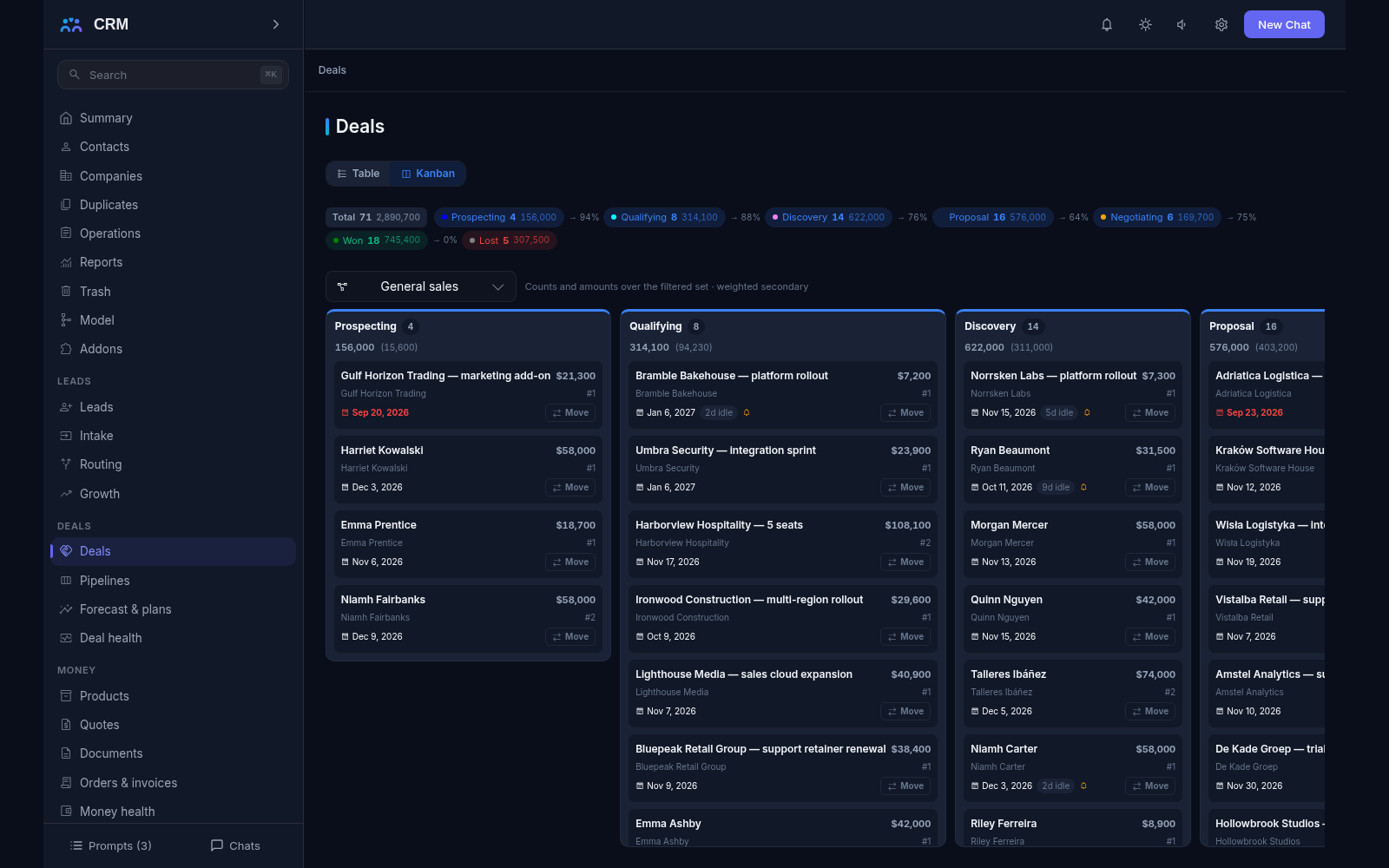
The add-on Deals shows sales visually: every sale is a card that moves along a pipeline from the first conversation to a win or a loss. You can see which stage a deal is at, what to do next, who is involved and how much revenue is expected this month.
Why you need it
While sales live in a manager’s head and in a spreadsheet, management sees only the result: did we close the month or not. It is unclear where a big customer stands, why a deal has not moved for three weeks, how much money will really arrive this month and how much of it is wishful thinking.
Deals makes sales predictable. Every deal is visible on one board, has an owner and a next step with a date, and a stalled deal raises a flag by itself. The plan and the forecast are computed from the same data the team works with every day — instead of being assembled by hand at the end of the month.
What it does
- Pipelines and stages as data. There can be several pipelines — one for new sales and another for renewals, for example. Stages are configured for your process: each has its own order, colour and close probability. Adding a stage or a whole pipeline needs no programmer, and every screen picks the change up at once. Past eight active stages the product warns; the hard ceiling is thirty.
- The movement journal. Every transition is recorded: who moved the deal, when, from which stage to which, for what reason, and how long the deal sat on the stage. A move backward or a skip is allowed but requires a reason, so the history stays honest. The journal keeps the stage titles of the moment, so renaming a stage never rewrites last quarter’s reports.
- Stage gates. A stage can require an open task, a filled amount, a next step of a minimum length, contact roles, a competitor link, a methodology block or an approved request. Until the condition is met the deal does not move, and the product names every missing piece and links to the field that fixes it. Gates are checked at the moment of the move — a deal already sitting on a stage is never re-validated later.
- Next step, cadence and worklists. Every open deal carries the answer to “what happens next” and a date. That gives three worklists: what to do today, what is already overdue and where no next step exists at all. A stage can carry a cadence that creates tasks on entry — once per task, never twice. Closing the last open task without a successor flags the deal red.
- Stalled deals and risk flags. Rules notice that a deal has had no stage move or no conversation for a while, that its close date has passed or that it carries no open task — and what happens next is your choice: raise a flag, alert the owner or the manager, create a task to look into it, or close the deal automatically. The last one is off by default, and a rule asking for it will not even save until you switch it on deliberately. The risk board ranks flagged deals by amount and by how long the problem has been standing.
- The deal team, splits and the buying committee. On your side a deal has members with revenue shares and watchers who receive events without gaining edit rights; the shares of everyone taking credit must sum to exactly 100, or the whole write is refused. On the client side you keep roles — who pays, who decides, who influences — with exactly one primary contact per deal, and reports list the deals with no roles or no engaged economic buyer.
- Competitors and close reasons. Competitors are kept in their own register, and a win or a loss always names a reason from the dictionary rather than free text; for some reasons a competitor link is mandatory. The competitor report also shows the share of deals where nobody named a reason — the “lost in silence” figure a win-rate chart normally hides.
- Discount approvals with deadlines. An approval chain has up to ten steps, each with its own deadline of up to a week and its own approvers. A step that is not answered gets a reminder, then an escalation, then the request expires — the ladder never decides anything on its own. The discount limits themselves stay in Money; Deals runs the approval procedure.
- Plans, quotas and the forecast. A sales plan covers a month, a quarter or a year and is split across people along the reporting line. Attainment compares the plan with the closed-won facts and shows the period-to-date pace. The forecast adds the closed fact to the probability-weighted pipeline and groups deals by category — in the plan, commit, best case, omitted — with scenarios and a coverage ratio. Where there is no plan, coverage reads as empty rather than as a zero.
- Funnel, velocity and bottleneck reports. Reports show how many deals sit at each stage, how fast they move through the funnel, where they stick and what share wins. The bottleneck report names the stage responsible, not merely the widest column. Daily pipeline snapshots are kept for two years, so “now” can be compared with “then”, and forecast accuracy is the period-start snapshot against the actual result. Reports export to CSV.
- Territories, currencies and legal entities. Territories answer “who owns which ground”: rules assign companies, a manual assignment is never overwritten by them, and the coverage report shows accounts, open pipeline and blind zones. Currencies carry manual daily rates — every amount is stored both in its own currency and in a base-currency companion that is frozen at close — and legal entities record which of your companies sells.
- Automation and bulk moves. Rules of the form “when this happens, do that” can move a stage, create a task, fill a field, notify someone, add a tag or create the next deal. A dry run lists exactly what would happen and writes nothing, and a person’s manual change always beats automation. Bulk operations move many deals at once through the same gates, with a preview, a per-row receipt and a revert inside the window.
- Your methodology, renewals and reactivation. If your team follows a sales methodology, its key questions become required blocks on the card — text, number, date or a contact role — and the matrix shows what is still unknown while reports link the fill rate to the win rate. Won deals carry renewal stamps: the sweep surfaces upcoming renewals in advance and drafts the renewal deal with its parent lineage. Lost deals enter reactivation cadences that stop on their own when the client replies.
How it relates to other add-ons
Deals has no required add-ons and works as soon as it is switched on. Other contours, however, rest on it: Money will not install without Deals, because its prices freeze the currency dictionary Deals maintains and its quotes, orders and invoices anchor to a deal; Marketing and Partners rest on Deals in the same way. The practical order is therefore simple: Deals first, then whatever leans on it. The reverse holds too — the product will not let you switch Deals off while a dependent add-on is running, because those contours would lose their base. Service adds a tickets block to the deal card when it is switched on.
Honest limits
- A lost deal cannot simply be “reopened”. A new attempt is a new deal or a reactivation cadence, so reports never mix two different stories.
- Stage gates are checked only at the moment of the move; deals already on a stage are never re-validated after a later gate edit.
- Automatic closing of stalled deals is off by default: a rule asking for it will not save until you switch it on deliberately.
- Points, leaderboards and achievements are off by default and switched on deliberately at deployment. They are threshold achievements, not a competition — nobody is punished for last place.
- Watchers and @mentions work inside the product only, and deal notes are internal by construction: nothing in the system emails a note body to a client, and no email or phone notifications go out from here.
- A currency without a rate is never silently turned into the base one and never counted as one to one: the product refuses and names the problem. A closed deal’s currency, its frozen base amount and its first-touch anchor can no longer change.
- A forecast over a dirty pipeline — deals with no close date and no next step — is always inflated. The product says so honestly instead of prettifying the digits.
- Per-entity document numbering does not appear in this add-on, and there are no day-by-day qualification snapshots: the completeness report grades what is stored today.
All add-ons → Add-ons catalogue