The add-on Chat puts a small chat window on your website: a visitor asks a question, leaves contacts or asks for a callback, and the enquiry lands in the CRM straight away. The built-in bot answers typical questions around the clock and hands the dialogue over to a living colleague when it cannot cope with the question itself.
Why you need it
A website visitor rarely calls and does not always write an email: if there is no answer right away, they simply go to a competitor — and you never even learn that they came. A contact form covers this only partly: it stays silent in reply and cannot answer simple questions such as your opening hours, the price of delivery or whether an item is in stock.
Chat gives the visitor a quick way to ask and gives you one more source of enquiries that never gets lost on the way. The bot takes the repetitive questions off the team, and everything that needs a person lands in the shared list of conversations with the whole story attached: who came, from where and what they asked.
What it does
- One line on your site. The widget is added with one short script tag served from your own site. It sets no tracking files, makes no requests to anybody else’s servers and needs no extra libraries, so the page’s weight and behaviour barely change.
- Consent first, records second. Until the visitor ticks the consent checkbox, not a single record about them exists: no session, no message, no conversation. The checkbox is the row’s own licence to exist, so there is no pile of data collected “just in case”.
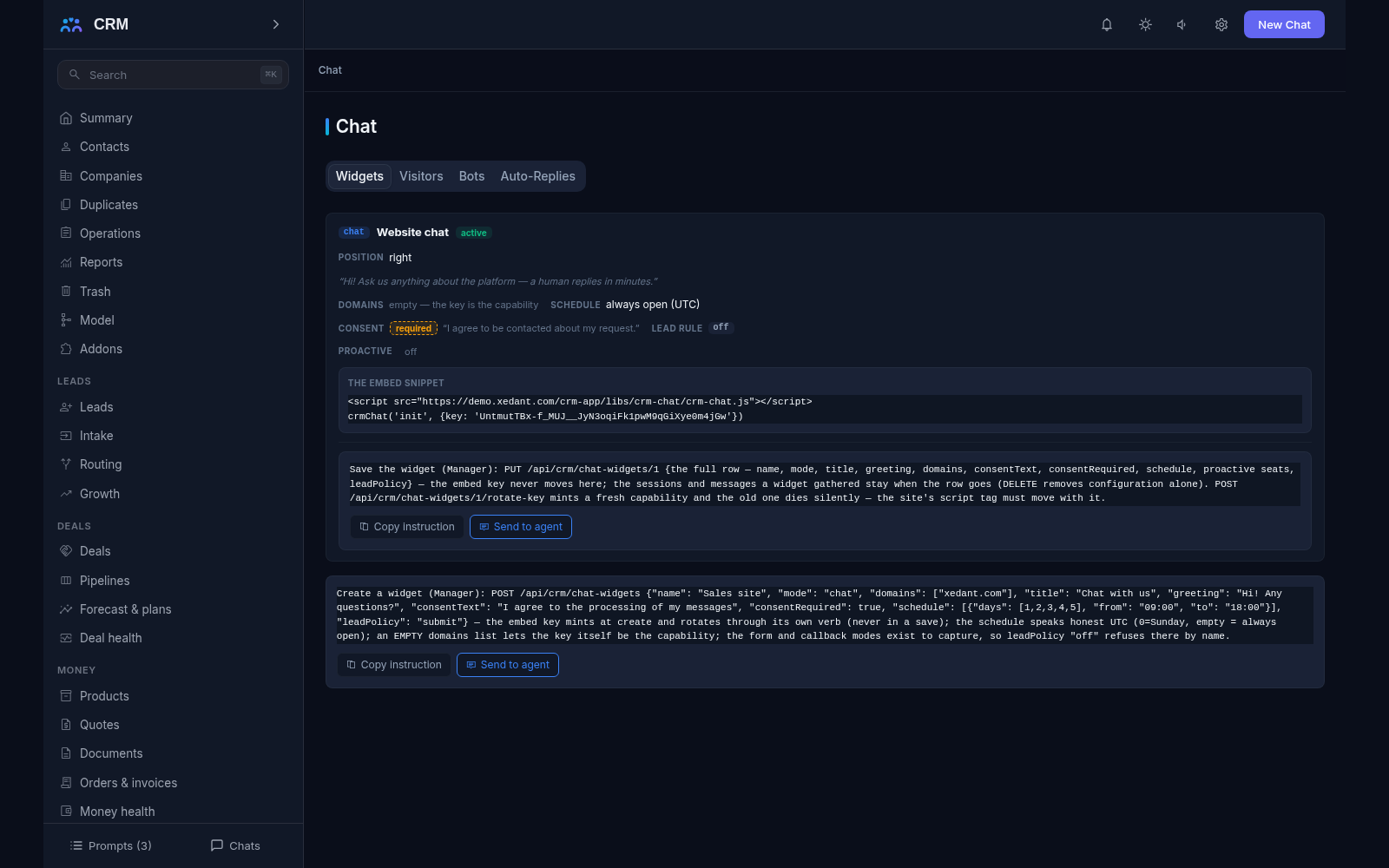
- Settings for your own site. A widget carries the list of domains it may run on (up to ten hosts), its mode — chat, form or callback — its title and greeting, your own consent wording and a schedule in honest UTC. It also carries up to five proactive invitations: a short text shown after a while on the page, and only when there is somebody to answer.
- No people, no window. The script asks the product about the state before it draws anything. If the schedule says closed, or the mode is chat and no colleague is online, the answer is “do not appear” with its own reason — the widget never promises a conversation that will not happen. The same check keeps the proactive invitations from poking a visitor when nobody is home.
- The visitor and the campaign they came from. A session keeps the campaign tags the visitor arrived with, verbatim, and when the visitor identifies themselves the session is attached to their customer card — in one direction only, and the first binding wins. Re-identifying never rewrites history and never glues one person’s data onto somebody else’s card.
- The enquiry becomes a lead. Identification can birth a lead through the one intake contract, by your own rule: at the moment the form is submitted, after a number of messages, or never. The campaign tags travel with the visitor into the lead’s attribution, so you see which advertisement brought the enquiry in.
- A bot built as data, not code. A bot is a validated flow: a question, an answer branch, a form that collects details, a handoff, and an answer written from your own facts. A form asks several fields in ONE message instead of dragging the visitor through a chain of single questions. The flow is checked whole when it is saved, and every gap is named — a dead end, an unknown target, an unreachable step.
- The way out to a human is always there. A bot’s flow without a reachable handoff step cannot be saved at all, and the talk-to-a-human button is drawn whatever the flow says: the exit is built into the machinery, not left to the author’s conscience. And when a visitor’s messages go unrecognised several times in a row, the bot stops by itself and the conversation moves to the needs-human seat — the routing rules honour the handoff when one stands, and the honest unassigned queue when none does.
- Taking a dialogue over, once and forever. A colleague can take a conversation away from the bot with one action. The walk freezes for that session with the moment written down, and the bot never returns to it — so a visitor never hears two voices from the same window.
- Ready replies as the cheap sibling. Auto-replies are keyword snippets: the highest-priority snippet answers, once per snippet per session, and stays silent whenever a bot walk has already claimed the session. They live under the same fence as the bots — several visitor messages in a row that no armed snippet matches also seat the conversation’s needs-human rung.
- Answers only from your own facts. The bot’s answering step is bounded to a topic set and answers from your own curated facts, and every answer carries its citation and the stamp of the source it came from. A question outside those bounds gets no invented answer: it gets the machinery’s own “I will get a colleague” line and the way out to a human.
- A report that reconciles with the journal. How many sessions ran, what share the bot closed by itself, how many it handed over, how many turns a dialogue takes on average, where visitors most often fall out, and which words went unrecognised — every figure is computed from the message journal when you read it. There are no separately maintained counters with a life of their own.
- One workplace. The Chat console is made of the tabs Widgets, Visitors, Bots and Auto-Replies. The console only reads: changes are made by agent commands, which can be copied straight from the interface.
How it relates to other add-ons
Chat declares one required add-on — inbox — and will not install without it. In practice the order is Inbox first, then Chat, and the product refuses to switch Inbox off while Chat is active, naming Chat as the dependent. The point of that dependency is a single history: a visitor’s dialogue is born as an ordinary conversation in the shared list, keyed by the session, with the same thread, the same queue and the same rules as mail and messengers — and the “agents online” gate the widget honours before it appears at all comes from the same inbox board that shows who is on duty. If Inbox is switched off, nothing breaks: sessions and messages keep journaling, and only conversations and the shared list stay away until it is switched back on. Everything Chat needs from a neighbour travels through a core contract with its own fallback, so the add-on never reaches into another add-on’s tables.
Honest limits
- There is no external language model here: the only shipped source of answers is your own curated facts, so a question like “what is the weather today” receives an invitation to call a colleague instead of an invented answer.
- Taking a dialogue over from the bot is irreversible: there is no “return to automatic mode” path. That is deliberate — a visitor should not receive contradictory answers from one window.
- The talk-to-a-human button cannot be removed from a bot. A flow without a reachable handoff step simply does not save; the exit is a law of the machinery, not an option in a settings screen.
- There is no search inside the visitor’s window: the widget’s search seat is a named deferral. The product’s own search still looks across conversations and contacts.
- No consent means no records at all: if a visitor never ticks the checkbox, the session cannot even open, and nothing is kept about them — an honest refusal rather than a later promise to delete something.
- A closed schedule, or nobody online while the widget is in chat mode, means the widget does not appear at all. Rather than showing a window nobody will answer, the product stays away and says why.
- A live operator panel inside the visitor’s window is not part of the add-on: only the bot and the automatic replies write into the visitor’s panel, and a dialogue that needed a human continues through other means — email, phone or messenger. That is a named gap, not a hidden fault.
- The contour is bounded and honest about it: one bot stands per widget (a second refuses by name, naming the standing one), a workspace carries up to ten widgets of up to ten domains each, a pre-chat form carries up to eight fields, and a session accepts twenty messages a minute before the refusal names the wait.
All add-ons → Add-ons catalogue