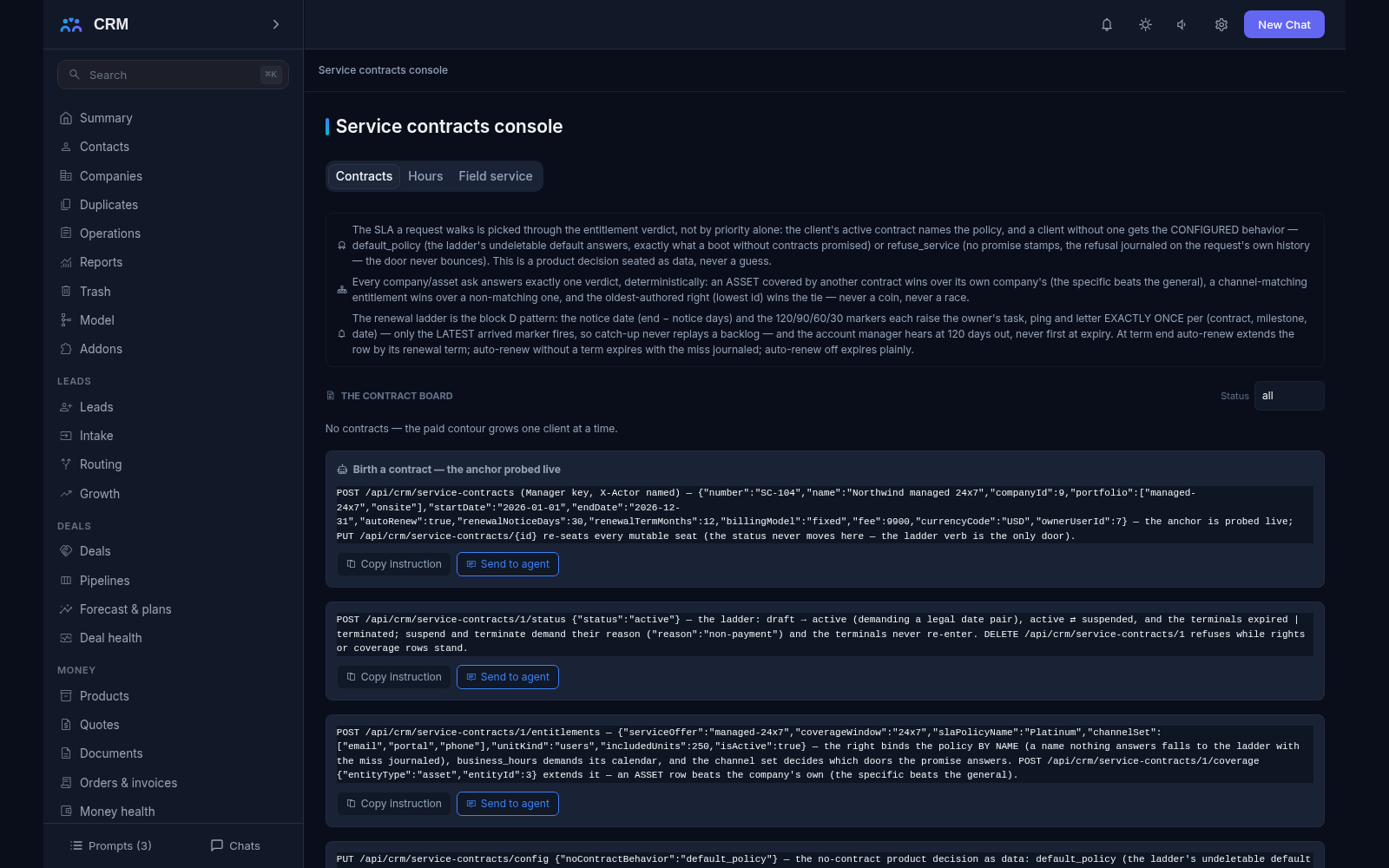
The add-on Contracts keeps service contracts: what service level each customer bought, for which sites and equipment, with which response times and until what date. It reminds you about renewal, tracks prepaid hour balances, computes credits for missed deadlines and schedules field visits. The whole picture is managed from the Service contracts console.
Why you need it
A customer bought a “gold” level with a one-hour response, and support does not know it: deadlines are set by the general policy and the promise is quietly broken. Prepaid hours are deducted by eye or not at all, a contract expires without anyone noticing, and renewal is discussed after the term has ended. Equipment at customer sites lives in someone’s notebook, and planned maintenance is remembered only when something breaks.
Contracts close all of this at once. A customer’s request deadlines start counting against the policy they actually bought, prepaid hours are deducted only by approved entries and never go below zero, and the owner hears about renewal months in advance rather than on the last day. The same figures are visible to the customer, so the office and the client read one truth.
What it does
- The contract itself. A contract row holds the customer company, a seat for the invoice in the money contour, the portfolio of offers, the gated ladder draft, active, suspended, expired or terminated, the date pair with its auto-renew, notice and term seats, and the billing model with the fee digits kept as data — money moves through money-contour documents when it moves.
- The right to a service level. One offer from the portfolio binds to one SLA policy by name, together with the coverage-window words, the channel set (which doors the promise answers) and the included units by kind.
- Who and what is covered. Coverage is listed by asset, site, user or the whole company. The specific beats the general: an asset covered by contract B answers B’s right even while its company holds contract A.
- The verdict the deadline ladder reads. For a company, and optionally for a specific asset, the product names the policy of the covering contract’s best right — a channel-matching right preferred, the oldest breaking a tie. A suspended or expired contract answers the no-contract behaviour you configured, with its reason riding the verdict. With no contract at all it answers the configured word: “default policy” (exactly what the fallback promised without this add-on, said aloud) or “refuse service”, where no clock is stamped at all and the refusal is journaled on the request’s history without bouncing the request. If no standing enabled row answers the named policy, the request falls to the general ladder and the miss is journaled — the product does not guess.
- Renewal starts early. The milestones at 120, 90, 60 and 30 days work around the end date, and each one raises the owner’s task, an in-app ping and a letter exactly once per contract and milestone — only the latest arrived milestone fires, so the account manager hears at 120 days rather than at expiry. An auto-renew contract extends by its own renewal months; without it the contract expires and the miss is journaled aloud.
- Prepaid hours. Hours are kept in pools, and the carry-over word decides the leftover’s fate: “lose” lets it die, “carry” hands it to the successor pool at its birth. A pool has a low-balance threshold (two hours by default), and one pool breathes at a time per contract, so a deduction is always unambiguous.
- The kind of work decides what burns. Remote, onsite and travel debit the pool whose window covers the worked moment. Project work never deducts anything — it is separate work, not service.
- Deduction only after approval. Only an approved time entry reduces the balance — exactly once, never below zero, with an overdraw refused by name. The approved row becomes frozen evidence the ledger reconciles against, and the used figure is always derived from the approved deducting entries inside the pool’s window, never kept as a counter that could drift.
- Warnings, and the “engineers forget to log” report. The first time the remainder crosses the low-balance threshold the owner gets a notification and a letter, once per crossing, and a top-up re-arms the ladder. Beside it sits a report listing resolved requests with no time entries next to unapproved entries older than the window.
- One figure for the office and the client, and credits for missed deadlines. The customer’s hours report reads the same aggregates the office reads, with the breach facts beside them — one metric, two interfaces. Service credits are computed from the breach facts: the count is journal-derived and the amount is the count times the per-breach figure seated in the contract. A credit is proposed first and settled by a person, one row per contract and window — nothing is charged automatically.
- Sites and equipment. A site is a company’s location with its time zone, work window and the people on site; a field request cannot even be created without one, because an address and a window are what make a visit a promise rather than a wish, and a dead site reference refuses by name. Equipment is a thin link onto the asset registry — one row per asset with its site, replacement group, coverage seat and last-service stamp — so no second inventory is created.
- A field visit with three separate timers and a checklist gate. Reaction, arrival and restoration are counted apart, each against its own target, and never blended into one number; every stamp is set once at the visit’s birth over the working calendar the contract’s verdict named, and a reschedule never recomputes the promise. Completion demands the matching checklist: every required item checked, every photo-required item carrying its photo and the customer’s signature when the template asks for it — an unmet rule refuses the completion and names what is missing. Travel and on-site spans are then logged as unapproved time entries against the covering contract, and the approval gate stays the only door that deducts hours.
- Preventive maintenance on an interval. Plans are set by interval, and the daily walker births exactly one visit per due date — a re-run doubles nothing. If several dates have accumulated it takes the oldest, one per pass. A refused birth is recorded while the plan stays in the missed-preventive report until a person fixes the cause, and the next due moment is stamped a full interval forward. The Service contracts console is made of the tabs Contracts, Hours and Field service, and it only reads: changes are made by agent commands you can copy from the interface.
How it relates to other add-ons
Contracts declares three required add-ons — service, sla and itsm — and will not install without all three. Service provides the requests, SLA the policies and working calendars, and ITSM the asset registry the coverage is set over; promising a service level is meaningless if there is nothing around it. The add-on catalog will not let you enable Contracts until all three are installed. The relationship also works in both directions: before stamping a request’s clocks, SLA asks Contracts for a verdict, and if the company has an active contract with a right to a policy, the clocks are stamped by that policy rather than the general one. Without this add-on the question is answered by the fallback — the default policy — and the help desk runs exactly as it originally promised.
Honest limits
- There are no rate cards, and a credit is not settled automatically through invoices: the amount is proposed and a person decides.
- Offline mobile work, a parts warehouse, a replacement fund, a dispatch board, geo-routing and a per-geography cost report are named deferrals.
- Equipment does not become a second registry: a row references an asset from the ITSM registry and keeps no inventory of its own.
- Preventive maintenance runs strictly by interval; calendar rules such as “every second Sunday” are not built.
- A visit’s promise is fixed when the visit is born and is not recomputed by a reschedule — a deliberate decision, because otherwise a promise could be “fixed” simply by moving the visit.
- When a checklist template requires no photos, the gate degrades to ordinary checkboxes.
All add-ons → Add-ons catalogue