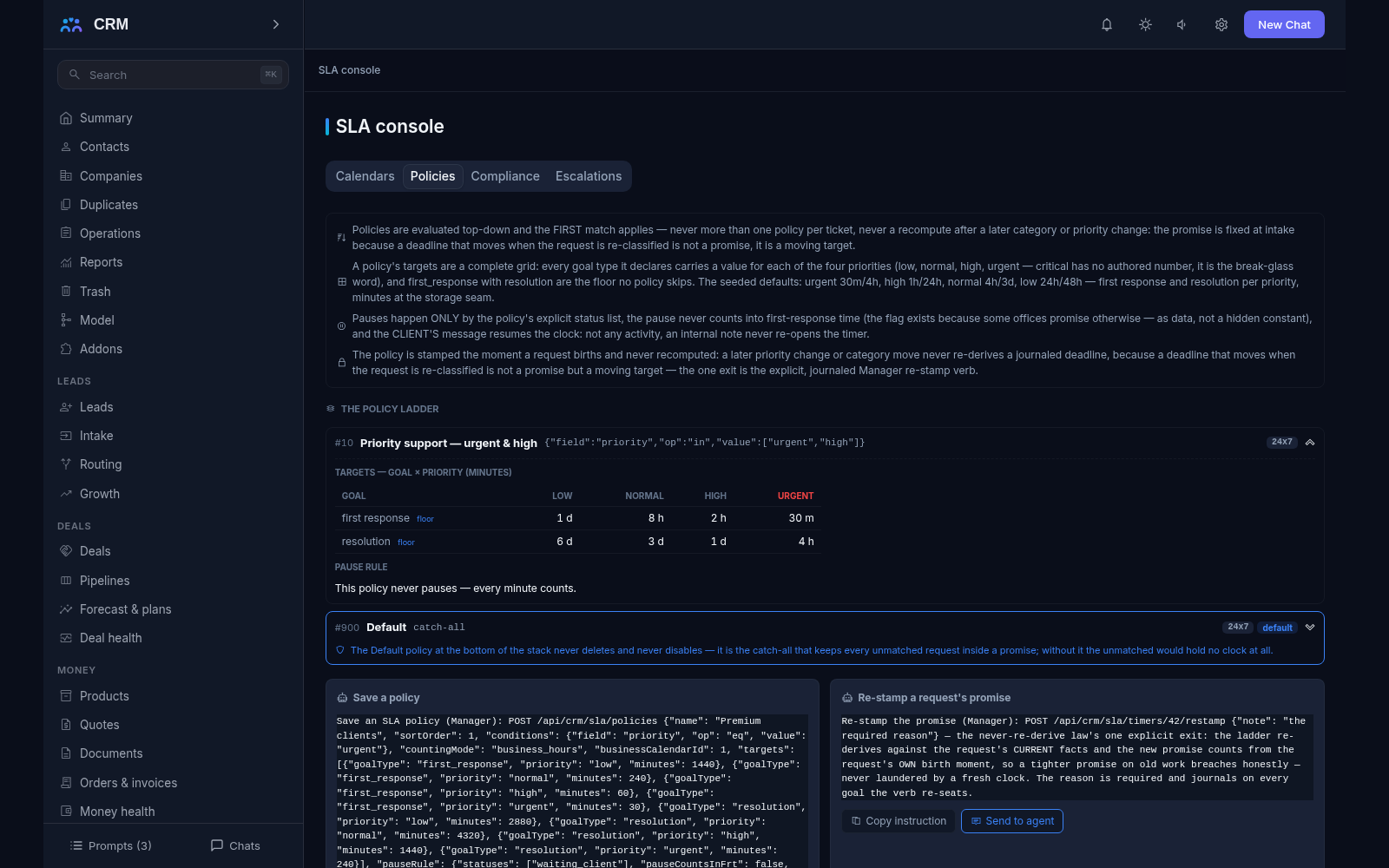
The add-on SLA turns the promises you make into rules and keeps them honest: working-hours calendars, target times for the first response and the resolution by priority, a deadline counted on every request, and a warning before a promise breaks rather than a complaint after it did. It also carries the escalation ladders. The SLA console has four tabs: Calendars, Policies, Compliance and Escalations.
Why you need it
The promise “we will answer within four hours” without working hours is fiction: a customer who writes on Friday evening is not fairly waiting for an answer on Saturday. And a manager who only sees the finished complaints learns that a deadline was broken after the customer has already given up.
SLA turns promises into measurable rules: the working days, hours and holidays of each office, the time allowed for a first response, a next reply and a resolution by priority, and a pause while the ball is in the client’s court. The team learns about a risk early — at a quarter of the window — instead of during the post-mortem, and the customer sees the same figures as the office, because both are computed in one place.
What it does
- Working-hours calendars. A calendar carries a time zone, the work week, the window of the working day and the holidays, and the arithmetic stays honest when the clocks change for summer time and back. One or two calendars is the practice — the office calendar plus a regional twin. Every part of the product walks the same calendar, from a request’s deadline to a field visit’s timers.
- Policies fixed at intake. Targets are gathered into ordered policies that are read top-down, and the first match is stamped on the request the moment it appears — later changes of category or queue never recompute it. One request always carries exactly one policy, and a Default policy always stands at the bottom of the list and can neither be deleted nor switched off. Re-stamping on purpose is a separate action with a required reason and a journal entry, never a silent rebuild.
- Three targets per priority. For every priority and request type you can set a different time for the first response, for the next reply and for the resolution, so different customers can be promised different things without blending them into one number. The target grid is a full replace: complete per goal type across all four priorities.
- Working hours or wall clock, said aloud. A policy names how its minutes are counted. On a boot without the SLA add-on, everything deadline-shaped reports elapsed wall-clock time and labels it as such — the product never pretends it counted working hours when it did not.
- Pauses by status only. The clock stops only on the statuses the pause rule names — waiting for the client, for example — and resumes when the customer writes back: their message returns the request to work and restarts the clock from the moment of that reply. A pause never counts into the first response unless the policy’s own flag says so, aloud. Pauses, resumes and breaches are journaled events, not estimates.
- A breach is a fact, not an opinion. If an answer lands after the deadline, the breach is recorded the moment it lands. An hourly pass decides the crossed deadlines exactly once per cycle and notifies the owner once per breached goal, and a manager can trigger the same pass by hand when waiting for the hour is not an option.
- Escalation ladders. A ladder watches one thing: the window of a named goal, a first response that never came, silence on the request, or a client nobody is answering. It carries ordered rungs — 50, 75, 90 and 100 percent of the window, minutes before or after the deadline, or hours of silence — and actions: notify the owner or the admins, raise the working priority one rung, reassign, or add a tag. Each rung has its own cooldown between firings and its own letter batch window, and each firing has a time to be acknowledged. Thresholds are evaluated in the calendar of the promise being watched, never on the astronomical clock, and no rung fires while the request waits on the client or after it has gone terminal. Every firing leaves both an event row and a fact on the request’s history.
- Acknowledging is a person’s act. A firing can be acknowledged (“I am on it”) or resolved (“this is dealt with”), and only a live employee can do either: the management key is refused by name, because a receipt signed by machinery would mean nothing. A firing nobody acknowledged in time moves the ladder to the next rung; one acknowledged in time never escalates, whatever the clock does.
- Compliance with a published formula. The Compliance tab shows performance by target and by slice with the formula published and the denominator visible: how many requests met the promise and how many breached it. Two managers cannot disagree about what “first response” means, because they read the same sentence and the same window. The compliance window reaches back 730 days.
- One console. The SLA console gathers the Calendars, Policies, Compliance and Escalations tabs. It only reads: changes are made by agent commands, which can be copied straight from the interface.
How it relates to other add-ons
SLA declares one required add-on — Service — because there are no requests to count without it, so the product will not let you install SLA on its own. The other direction matters more: Service works fully without SLA, and everything deadline-shaped either goes absent or honestly reports elapsed wall-clock time. Portal reads the same compliance aggregate the office reads, so a customer sees the same figures computed once. Contracts can name a policy by name through an entitlement, and that promise outranks the ordinary conditions walk; with no contracts, the ordinary walk and the Default policy apply exactly as they would without the link. Escalation pings land in the Notifications feed, and letters leave through your normal mail.
Honest limits
- An escalation warns, it does not solve. It raises the priority, notifies people and reassigns work; only a person can acknowledge or resolve a firing, which is exactly why the management key is not accepted for it.
- Raising the priority never touches the stamped policy: the promise fixed when the request appeared stands. This is deliberate — otherwise urgency would quietly replace a commitment.
- Times in the speed and quality reports are wall-clock; working hours apply to deadlines alone. A pause is subtracted from the resolution time but not from the first response unless a policy says otherwise, and the difference is stated in the methodology.
- The breach pass runs once an hour, not at the instant a deadline breaks, so a breach can be marked up to an hour late. The manual pass exists for anyone who does not want to wait.
- A policy named by a contract that no standing enabled record answers falls back to the ordinary walk and journals the miss. A “similar” policy is never substituted silently, and a request with no promise at all is honestly reported as having no clock.
- Escalation letters need your SMTP settings. Without them the firing still stands in the journal and the in-app ping still lands; only the letter is skipped, and it says so.
- Pauses here work by request status. A door-driven pause — an incident freezing the clocks of the requests it swallowed — comes from ITSM, and the two families resume by their own rules without stealing each other’s exits.
All add-ons → Add-ons catalogue