The add-on Portal gives your customers their own room: they see their own requests and documents, submit new ones through your forms, browse the service catalog and read the published knowledge base — without calling your team. You decide exactly what each customer can see, and you can be sure that no one reads another account’s records even by accident. The whole picture is managed from the Portal console.
Why you need it
A large share of support calls are really the question “what is happening with my request”. The customer cannot check the status, so they call or write, and an employee spends time retelling what already sits in the system. Requests also arrive however they like: one in the shared mailbox, one by phone, one told to a colleague — and details get lost along the way.
Portal gives the customer a place of their own: a request list with statuses and correspondence, a request form, the service catalog and the open knowledge base. A submitted request immediately becomes an ordinary request and lands in the same queue as the emails, with an owner and a deadline. You decide precisely what each customer sees, and a record outside their scope simply answers as if it did not exist.
What it does
- Customer accounts, kept apart from office ones. Portal users are invited customers tied to a contact, never office users. The two account families do not overlap by construction: an office token is refused on portal pages and a portal token on office pages. A password set by an office invitation works at once, while someone who registered themselves waits for an explicit yes from moderation. Using a password-reset link ends every session standing on the old password.
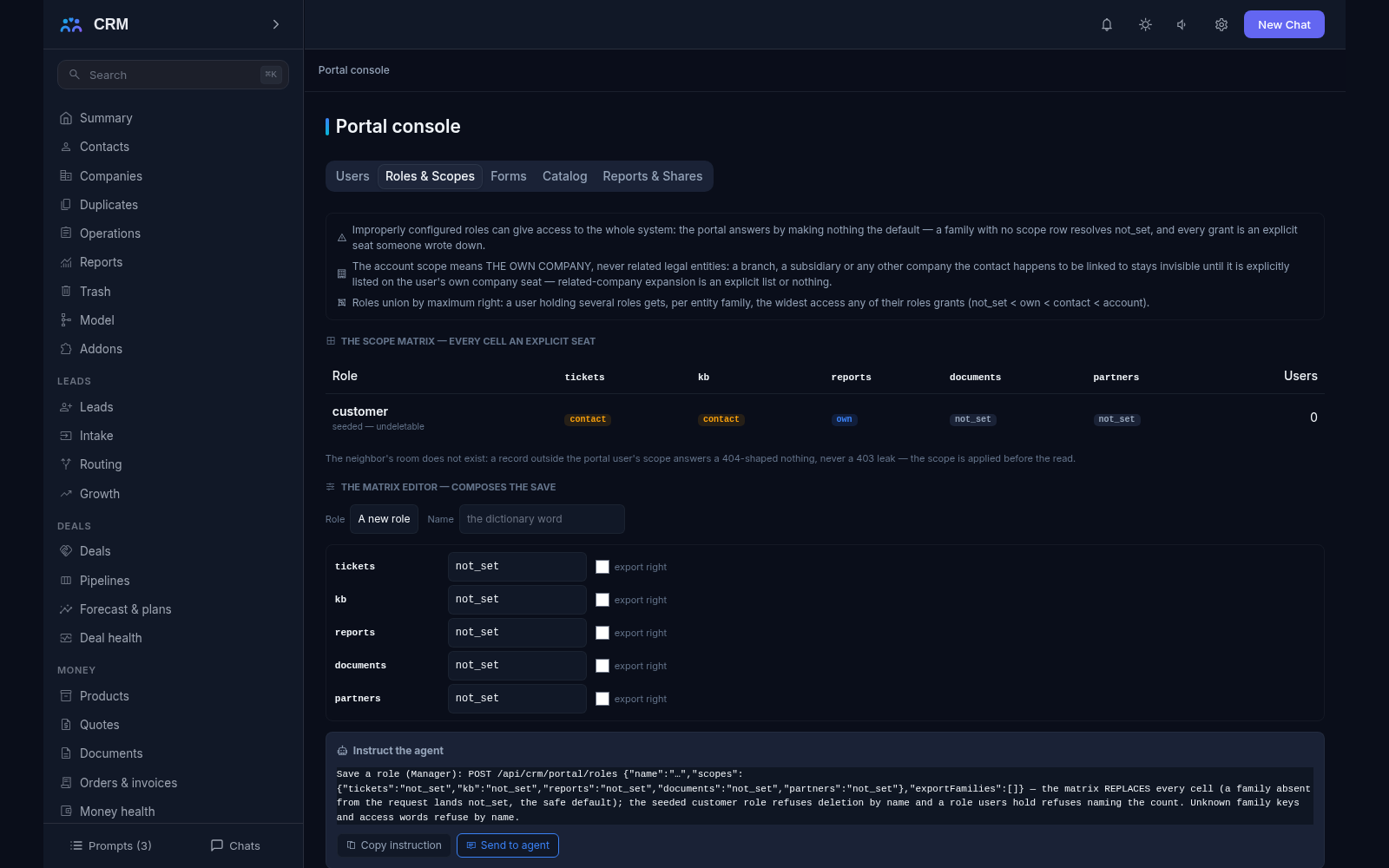
- Visibility by scope. Every role carries one of four scopes per family: not set (nothing), own (their own requests), contact (the contact’s requests) or account (the whole customer account). The account scope covers the customer’s own company alone — related legal entities never ride along.
- Foreign records answer nothing. A request from another company answers an empty “not found” page, never a “this exists but is not yours” message: the existence of a foreign record is not confirmed. This is pinned for every portal surface, not just the main one.
- Internal words stay internal. Internal notes and internal attachments are absent from the data the customer’s page is rendered from — not merely hidden on the screen. A link to an internal file answers the same empty page.
- Request forms. A form is assembled from eight field types: text, multi-line text, list, multi-select, date, number, checkbox and file. A field can be shown by condition, but only on fields ordered above it, so a form cannot tie itself in knots. Three or four required fields are recommended with a save-time warning, and a hard ceiling refuses a form turned into a questionnaire. The reporter picks the perceived severity; the deadline does not come from it — the target queue decides.
- Antispam that answers honestly. A hidden trap and rate caps per form and per address. Every limit is visible on the page before the submit, and an address that hits its cap gets an honest wait in seconds. The trap answers a bot with a success-shaped card and writes nothing, and the receipt — the request number and the confirmation letter — doubles as protection from accidental duplicates.
- A “check your answers” step. Before submitting, the customer is offered the matching published knowledge-base articles; internal ones can never appear. Every ask is journaled, so you can see which questions a published article could have closed. Without the knowledge add-on the page says honestly that it has nothing to suggest.
- The service catalog. The customer picks what they need and the catalog decides where the request goes and how fast: the request inherits its deadline from the item’s target seats, never from a “general” policy. An item reserved to a partner tier shows an ask-the-office card with no door.
- Fixed reports in the room. Request volume and resolution over 30, 90 or 365 days, service-level compliance on the customer’s own requests, and an activity timeline. Compliance is computed by the same derivation the office reads, so the customer’s numbers and the company’s numbers agree, and the methodology prints beside the figures.
- Document shares, one document at a time. A document is opened to one person or to their whole account — a single grant, never a folder permission. Downloading is a separate decision from listing, and a share either names its death moment inside a 730-day horizon or stands until revoked. An expired grant answers exactly like a foreign one. Every download is journaled twice: in the portal’s action journal and in the office’s sensitive-access log.
- The cabinet’s own look. The name, accent colour and logo URL are set on the workspace. The cabinet is rendered on the server without heavy browser scripts, so pages open fast and behave the same on any device.
- One workplace that only reads. The Portal console is made of the tabs Users, Roles & Scopes, Forms, Catalog and Reports & Shares. It changes nothing itself: changes are made by agent commands, which you can copy straight from the interface.
How it relates to other add-ons
Portal declares two required add-ons — service and knowledge — and will not install without them: without Service there is nothing to show in the room, and without the Knowledge Base there is nothing to read in the public section. The add-on catalog will not let you enable Portal until both are installed; the two dependencies are consumed through core ports. With SLA the room shares one deadline derivation, so the customer sees on their own requests the same compliance the office reads — and with SLA switched off that seat honestly goes absent while the volume report, computed from the event window alone, keeps working. Partners is built on the same machinery: a partner account is a portal user at heart.
Honest limits
- The commercial cabinet is missing: a customer will not see invoices, orders or contracts here. This is a named deferral with the seam recorded — the place for it exists, the section itself does not.
- There is no report builder in the room: reports are fixed and pre-assembled. The reason is plain — a free builder is both a leak risk and an extra support burden.
- Document shares work one document at a time. A folder cannot be handed over in one grant, and that is a deliberate decision: a folder is not the same as an explicit permission.
- Several portals, custom domains, two-factor authentication and single sign-on are deferrals. Today a portal has one address and an ordinary login and password.
- Customer credentials never ride export or import: a world restored from an export re-invites its users. Passwords never enter the export file — otherwise a database copy would be a key to every room.
- A customer receives a document only after an explicit grant by your staff; there is no single setting to “show everything that sits on the card”.
- The theme engine is the named deferral: branding is the cabinet name, the accent colour and a logo URL.
All add-ons → Add-ons catalogue