Hooks are the enforcement layer of Xedant Code’s validation system. While skills guide the model’s behavior through instructions, hooks enforce rules by blocking specific tool calls before they execute. The most impactful use of hooks is preventing the model from running build and lint commands manually — since automated builds handle this more efficiently, every manual build the model attempts is wasted time and tokens.
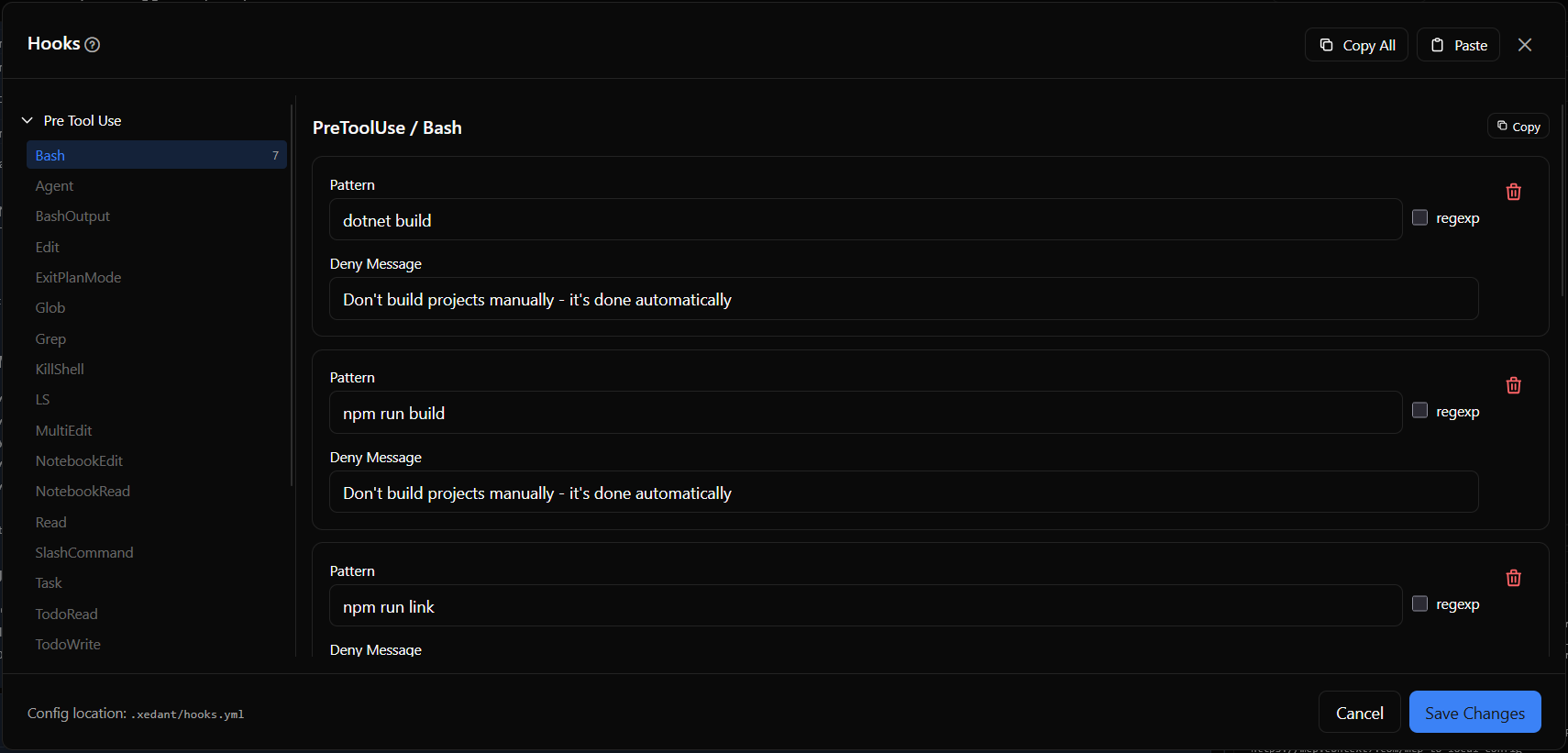
Hook Events and Types
Hooks are organized by event type. Xedant Code supports two events:
- PreToolUse — Runs before a tool is executed. This is where deny rules and pre-execution commands are defined. Hooks can target specific tools: Bash, Edit, Write, Read, Glob, Grep, Agent, NotebookEdit, and others
- UserPromptSubmit — Runs when the user submits a prompt to the AI. Use this to validate or modify user input before processing
Deny Hooks
Deny hooks block tool execution by matching patterns against the tool’s input. For Bash tools, the pattern is matched against the command string. For non-Bash tools, use .* as a catch-all pattern to deny the tool entirely.
Each deny hook has four fields:
- Pattern — The text or regex pattern to match against the tool input
- Regex — When enabled, the pattern is treated as a regular expression (case-insensitive). When disabled, it’s matched as a substring
- Message — The denial message shown to the user when the hook triggers
Execute Hooks
Execute hooks run a shell command before the tool executes. They receive context about the tool call via stdin as JSON and can return structured output that influences the model’s behavior. The $CLAUDE_PROJECT_DIR environment variable is available in the command.
Preventing Manual Builds
This is the single most impactful use of hooks in Xedant Code. When automated builds are configured, the model should never attempt to build, lint, or start the project manually. Without these hooks, the model routinely runs build and lint commands after every edit — wasting time and tokens on actions the build system already handles.
preToolUse:
  Bash:
    - type: deny
      pattern: "dotnet build"
      message: "Don't build projects manually - it's done automatically"
    - type: deny
      pattern: "npm run build"
      message: "Don't build projects manually - it's done automatically"
    - type: deny
      pattern: "npm run link"
      message: "Don't lint projects manually - it's done automatically"
    - type: deny
      pattern: "npx svelte-check"
      message: "Don't lint projects manually - it's done automatically"
    - type: deny
      pattern: "npm run check"
      message: "Don't lint projects manually - it's done automatically"
    - type: deny
      pattern: "npm run dev"
      message: "Don't start projects manually - it's done automatically"
    - type: deny
      pattern: "dotnet run"
      message: "Don't start projects manually - it's done automatically"
userPromptSubmit: {}
When a deny hook blocks a command, the model receives the denial message and adjusts its behavior. Over the course of a session, this saves dozens of unnecessary tool calls that would compound into significant time and cost savings. You must always start with adjusting skills and CLAUDE.md to minimize amount of model-initiated builds, using hooks as a last-resort guardrail when the model forgets about your requirements when the chat gets long or compacted.
Claude Code Integration
Hook configurations stored in .xedant/hooks.yml are automatically synced to Claude Code’s native hooks system. The sync process converts YAML definitions into JSON format and writes them to .claude/settings.local.json, so the hooks take effect on the next user prompt in the chat.
The sync flow works as follows:
- On startup and after each save,
HooksServicereads the YAML configuration - Each hook definition is converted to Claude Code’s JSON format with the executable path resolved automatically
- Hooks are deduplicated by command to avoid conflicts
- The JSON is written to
.claude/settings.local.json - Currently running sessions use the old hooks until the next user prompt is sent
The executable path for hook processing is resolved automatically by checking several locations: next to the running process binary, in the application base directory, or falling back to dotnet XedantCode.dll.
Other Validation Uses
Beyond preventing manual builds, hooks serve other validation purposes:
- Blocking destructive operations — Deny
rm -rf, force pushes, or other dangerous commands that could cause irreversible damage even inside a container - Enforcing project-specific policies — Block writes to specific protected files, prevent edits to configuration files, or deny modifications to test fixtures
- Custom validation logic — Execute hooks can run shell commands before tool execution, enabling pre-commit checks, format validation, or custom guards
Config validation automatically checks hooks.yml on save, warning about unknown event types and properties. Errors reference the relevant section in .xedant/README.md.
Effective Validation Patterns
- Always deny manual builds when automated builds are configured — This is the highest-impact hook configuration. Add deny rules for every build and lint command the model might try
- Use substring matching for simple patterns —
pattern: "npm run build"withregex: falsecatches any command containing that substring, including with extra flags - Use regex for complex patterns — Enable
regex: truewhen you need case-insensitive matching or pattern syntax likerm\s+-rf - Test hooks after saving — Hooks take effect on the next user prompt. Send a test prompt and verify the hook blocks the expected commands
For the complete hooks reference, see Hooks. For the build system hooks prevent manual runs of, see Build & Deploy. For Docker isolation that makes hooks a safety net rather than a gate, see Docker Isolation & Skip Permissions.