The add-on Feedback asks customers how the work went and turns a low score into a task for a named person. The three instruments are never mixed: satisfaction (CSAT, 1 to 5), effort (CES, 1 to 7) and willingness to recommend (NPS, 0 to 10), and every score is asked together with an open “why”. The whole picture is managed from the Feedback console.
Why you need it
An ordinary survey usually ends as an average number. A customer gave three out of five and explained why — and that is where it stops: nobody calls back, no work on the mistake begins, and a month later the customer simply leaves. A bad score stays a row in a table, although it is the most useful news of the week.
Feedback closes that gap: a low score immediately becomes a task with an owner and a due date, and honest numbers about the team’s work sit beside it — how long customers wait for a first answer, how often requests come back, which customers are doing worse and how many people a shift needs. Every figure is derived from the journal at the moment a report opens, so nothing can be “corrected by hand”.
What it does
- Three different questions, not one questionnaire. CSAT (1 to 5) asks about a particular piece of work, CES (1 to 7) about the effort the customer had to spend, and NPS (0 to 10) about the relationship as a whole. Answers are never added together into one number, and the open “why” is always asked.
- Asked after the work, and not to everyone. An hourly sweep sends the asks that have come due. A request that no agent ever answered is never surveyed. One customer receives at most one ask a week, counted across all three instruments together. A suppressed ask never disappears silently — its row carries a named reason. At most one reminder is sent.
- Two doors for the answer. A single-question page opened from the letter, and the portal room’s own authenticated seat when the Portal add-on is on, so a customer can answer from inside the cabinet. The answer is bound at answer time to the request, the agent, the queue, the channel and the category — which is why you can later see which team and which topic produce low scores.
- A low score is a task, not an average. A score below the threshold opens a follow-up owned by a named person — the instrument’s own seat or the graded agent — due within a day. The office’s policy decides whether the request also reopens, and the reopen-rate impact is stated plainly in the rules.
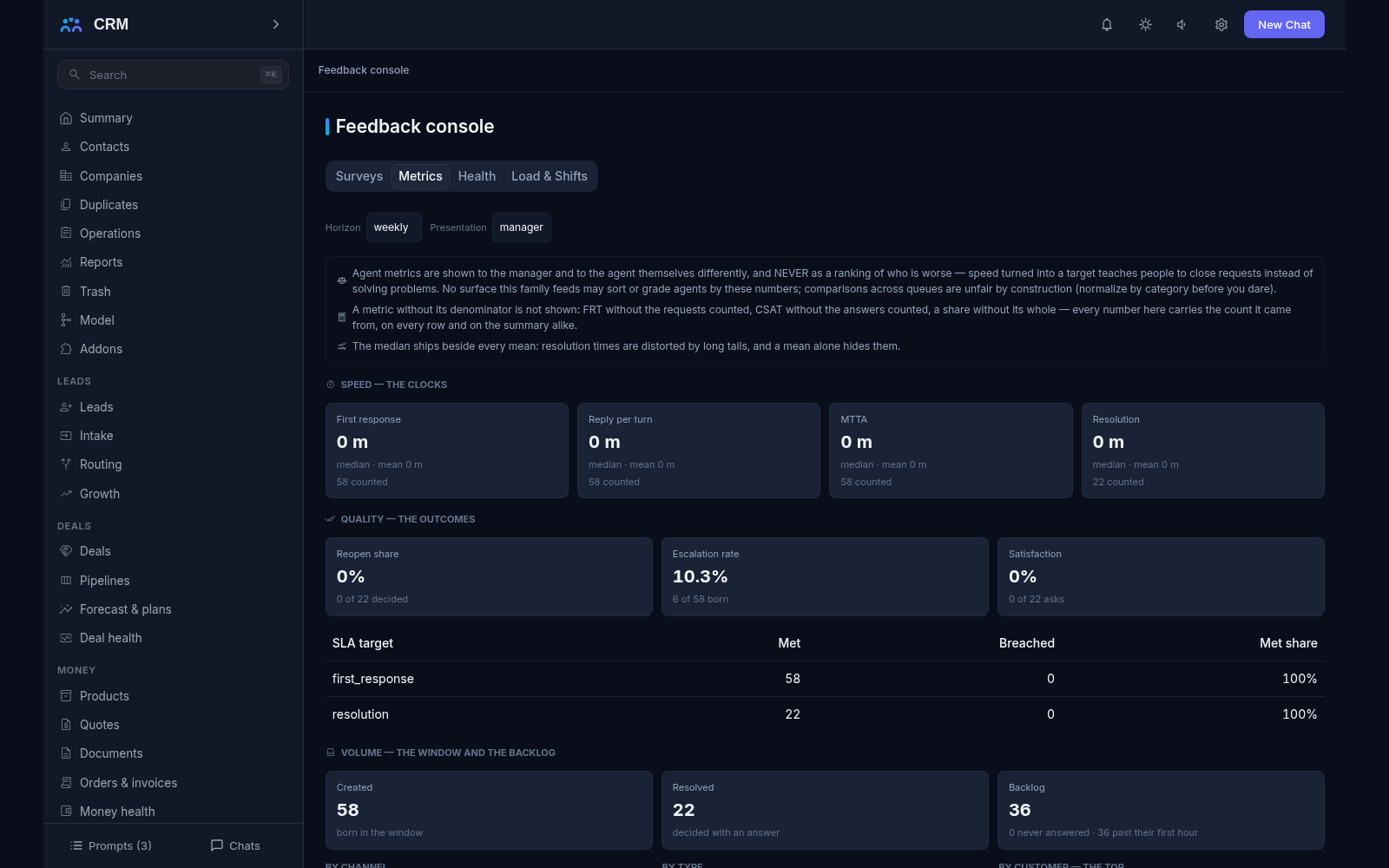
- Speed reports with published formulas. First response counts from creation to the first agent answer, with the autoreply excluded. Reply per dialogue turn, time to take the work and time to resolve are counted separately, each as both median and mean, so one long-running request does not spoil the picture.
- Quality, volume and routing. Reopen share, escalation rate, service-level compliance (through SLA where it is on) and customer scores; volume cut by channel and type, the point-in-time backlog with its age bands, the share stuck without an answer and volume per customer; and routing — time to triage, time to assign and the reassignment share.
- Every figure carries its basis. Each formula is published verbatim on a pinned rules page, every share sits beside the count it came from, and the horizon switches between realtime, daily and weekly. The role changes the width of the picture: an agent sees their own desk, a manager the whole window.
- Agents are never ranked. No screen builds a best-to-worst list — this is a written product rule, and the sentence is printed on the report itself. The numbers are there for growth, not for punishment.
- Customer health with owned reds. One configured model sums weighted factors (each from 0 to 10) with green, yellow and red bands set as data and the red floor strictly below half. The factor breakdown prints beside the score: the score is exactly one hundred minus the sum of the penalties, so no black box is needed. A company with too few requests answers “unknown”, never a random number.
- A red signal is a work item. It either belongs to a named person or stands unacknowledged and first in the list. Only a person can acknowledge and own it — the manager key does not qualify. Resolving demands a note naming the action taken, and a company leaving the red band has its standing signal resolved by the product with its own attribution.
- Load and shifts. Arrivals are bucketed by hour of day and day of week in the chosen time zone, with average handling minutes and the carried-over backlog beside them. The forecast is a weekday average over a window of two to twelve weeks, quiet weeks counting as the zeros they were, and at low volume the product says plainly that seasonality here is noise. Shift plans are entered by hand — one table per team and date, windows tagged shift or on-call, the demanded headcount, who is seated and a note about skills; vacations and absences ride the plan. A per-user schedule is derived from the plan, never stored.
- A capacity warning, never a target. Forecast demand in handling minutes is compared with seated minutes, and every hour answers where it is over or short, with a direct suggestion — seat another shift or move the work, never work harder. An on-call window counts zero capacity by law, and the utilization percentage prints beside the pinned sentence that utilization is a warning, never a target.
- Works without SLA, and only reads. With the SLA add-on switched off, the escalation and compliance seats simply go absent and say so instead of showing zeros, while everything else is computed from the journal. The Feedback console is made of the tabs Instruments, Score report, Health and Load & Shifts; it changes nothing itself — changes are made by agent commands you can copy from the interface.
How it relates to other add-ons
Feedback declares one required add-on — service — and will not install without it: asking only makes sense about completed work, and work lives in requests. The add-on catalog will not let you enable Feedback until Service is installed. With SLA the relationship is soft: when it is on, escalation and service-level compliance fill the reports; when it is off, those sections go absent and say so. Portal is the reverse relationship — the cabinet gives the customer a second door to answer the question. Customer health and the load figures need neither: they are derived from the journal.
Honest limits
- The “why” a customer writes is not analysed by an external language model: the score and the configured rules do the work. A seat for such a model exists, but the model itself is not connected.
- Customer health walks the client’s own history only. Mood from correspondence, social media mentions and customer lifetime value are named deferrals.
- Reports are derived at the moment they are opened: there are no stored snapshots, no “trend over a year” charts and no export to a BI system, and neither first-contact resolution nor cost per contact is built.
- The forecast knows only weekday averages: seasonality, schedule adherence and “what if we seat two more people” scenarios are not built.
- On-call rosters and the calendar and absence integration are deferrals — the shift composition is entered by hand.
- No screen compares agents with each other, and that is a product decision, not a setting.
All add-ons → Add-ons catalogue