Hooks are strict rules that Xedant Agent enforces on the model: while skills and the CLAUDE.md file explain to the agent how to work, hooks simply do not let it take an unwanted action. The most useful application of hooks is forbidding the model to run builds and code checks manually. The automated build system already does that on its own, faster and without waste, so every manual attempt by the model is lost time and money.
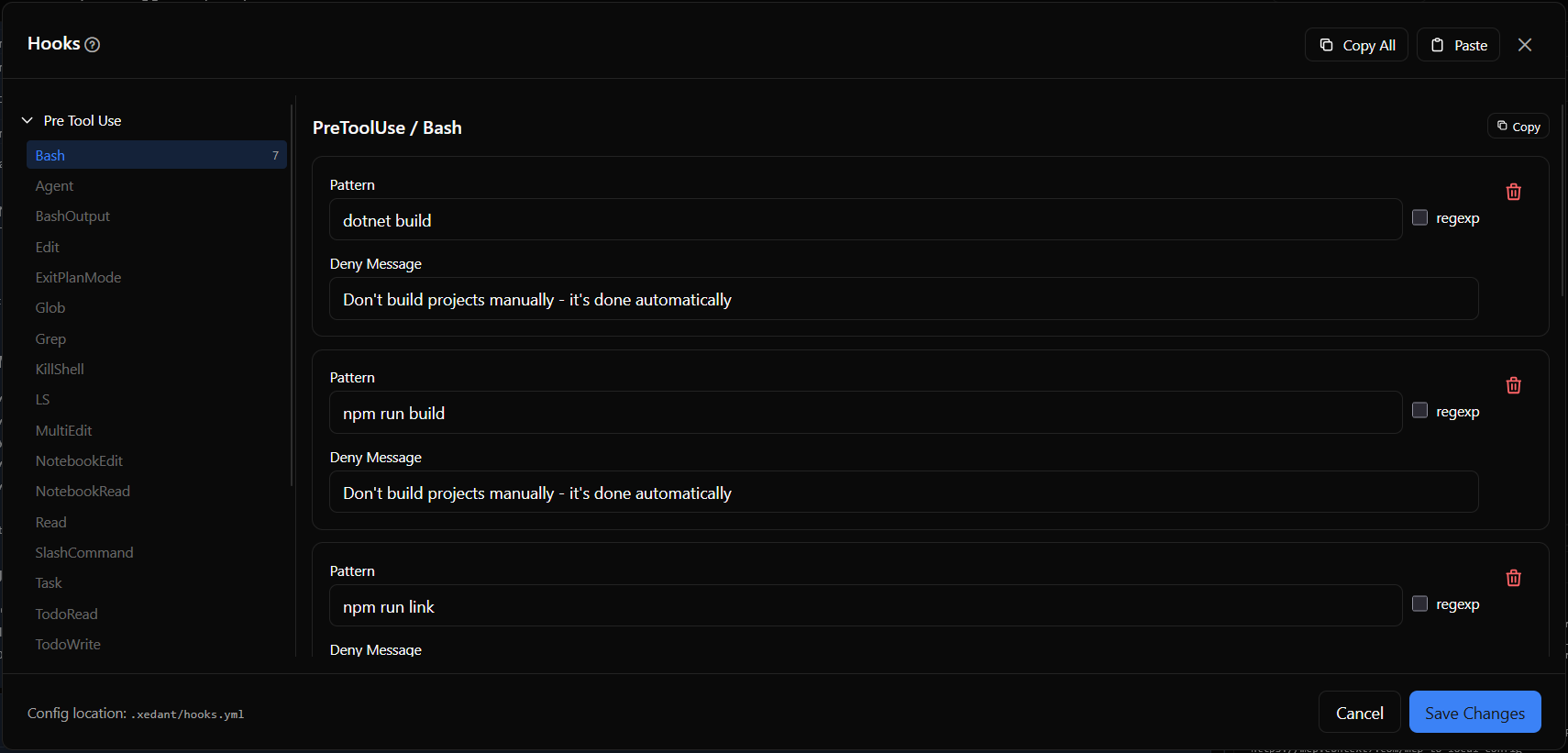
Hook Events and Types
Hooks are grouped by events — the moments when they fire. Xedant Agent supports two events:
- PreToolUse — fires before any tool (a model action) runs. This is where bans and preparatory commands are defined. A hook can be bound to a specific tool: Bash (terminal commands), Edit and Write (editing and creating files), Read, Glob, Grep (search and reading), Agent (launching another agent), NotebookEdit, and others
- UserPromptSubmit — fires when you send a message to the model. Use it to check or modify your request before processing begins
Deny Hooks
Deny hooks block a tool call by comparing the tool’s input against a given pattern. For terminal commands (Bash), the pattern is compared against the command string. For every other tool only the catch-all pattern .* (matches everything) works — that is how a tool gets banned entirely.
Every deny hook has three main fields:
- Pattern — the text or search mask that the tool’s data is compared against
- regexp — when checked, the pattern is read as a regular expression (a flexible mask that ignores letter case); when unchecked, as a plain substring to look for in the text
- Deny Message — the rejection text that you and the model will see when the hook fires
Execute Hooks
Execute hooks run a command in the terminal before the tool runs. The command receives the tool call details through standard input as JSON (a structured way to present data) and can return a response that changes how the model behaves. The environment variable $CLAUDE_PROJECT_DIR — the path to your project folder — is available inside the command.
Blocking Manual Builds
This is the main use of hooks in Xedant Agent. If you have automated builds configured, the model must not run builds, code checks, or the project itself — otherwise it spends time and tokens (the portions of text you pay for) on what the system already does on its own. Without hooks, the model repeats that work after every file change.
PreToolUse:
  Bash:
    # project build (compilation)
    - type: deny
      pattern: "dotnet build"
      message: "Don't build projects manually - it's done automatically"
    - type: deny
      pattern: "npm run build"
      message: "Don't build projects manually - it's done automatically"
    # code checks (linters, type checking)
    - type: deny
      pattern: "npm run lint"
      message: "Don't lint projects manually - it's done automatically"
    - type: deny
      pattern: "npx svelte-check"
      message: "Don't lint projects manually - it's done automatically"
    - type: deny
      pattern: "npm run check"
      message: "Don't lint projects manually - it's done automatically"
    # running the project
    - type: deny
      pattern: "npm run dev"
      message: "Don't start projects manually - it's done automatically"
    - type: deny
      pattern: "dotnet run"
      message: "Don't start projects manually - it's done automatically"
UserPromptSubmit: {}
When a deny hook blocks a command, the model receives the rejection message and corrects its behavior. Over a single session this saves dozens of unnecessary actions — and, with them, noticeable money. Still, start with settings and the CLAUDE.md file so the model less often tries to do extra work on its own, and keep hooks as the last line of defense: they catch the model when it forgets the rules — for example, in a long or tightly packed conversation.
How Hooks Reach Claude Code
Hooks are stored in the .xedant/hooks.yml file — a readable text file with simple syntax. Xedant Agent automatically carries them over into Claude Code’s own hook system: it converts the settings to the required format and writes them to the .claude/settings.local.json file. The hooks take effect at your next message in the chat.
Synchronization works like this:
- At program startup and after every save of the file, the hooks service reads the settings from the YAML
- Each hook is translated into Claude Code’s format, with the address of the running app’s hook endpoint filled in automatically
- Hooks with the same command are merged so there are no conflicts
- The finished settings are written to
.claude/settings.local.json - Sessions that are already running keep working with the old hooks until your next message
You also do not need to tell Claude Code where the hook checker lives: each synced hook is a short curl command (a standard tool for sending data over a network) that hands the tool call to the running app’s own address. The app fills that address in automatically, so the hook always reaches the copy of Xedant Agent that is already running — the one that re-reads hooks.yml after every save.
Other Ways to Use Hooks
Beyond blocking manual builds, hooks solve other tasks:
- Protection from dangerous commands — banning
rm -rf(deleting folders with everything inside), force-pushes to git, and other operations whose damage cannot be undone, even inside an isolated environment - Enforcing project rules — banning writes to specific protected files, edits to settings files, or changes to test data
- Your own check logic — execute hooks can run any command before each model action: a check before pushing to git, formatting control, or your own protections
The settings are validated automatically on every save of hooks.yml: the program warns about unknown events and properties, and its error message points you to the right section of the .xedant/README.md documentation.
Practical Tips
- Always block manual builds when automated ones are configured — this is the most useful hook setup. Add deny rules for every build and check command the model might try
- Simple pattern, simple search —
pattern: "npm run build"withregex: falsecatches any command containing that phrase, including with extra arguments - Complex patterns, search masks — turn on
regex: truewhen the pattern must cover several variants, for examplerm\s+-rf(deletion with any number of spaces) - Test hooks after saving — new rules take effect at your next message. Send a test message and make sure the hook blocks the commands you want blocked
The complete hooks reference is in the Hooks section. For the build system that hooks protect from manual runs, see Build & Deploy. For environment isolation — which makes hooks an extra layer of protection rather than the only barrier — see Docker Isolation & Skip Permissions.